Damien Sauzin, Frédéric Vella, Nadine Vigouroux (2022). SoKeyTo: A Tool to Design Universal Accessible Interfaces. In: Advances in Ergonomics In Design, Usability & Special Populations: Part I. AHFE Open Access, vol. 18. https://doi.org/10.54941/ahfe100834
Many activities of daily living, such as picking up glasses, controlling the house environment, typing text … can become insurmountable for people who have upper extremity disabilities. The alternative to ask for human help is to use some assistive technologies (AT) to compensate for their motor impairment. There are a lot of available AT responding to these needs. However, there are two limitations. The current devices force the handicapped person to use different ATone for each activity and to acquire another AT if his/her impairment changes. The SoKeyTo platform is an environment which offers functions to design virtual interfaces (robotic arm, home control and virtual keyboard for text input). We analyzed and compared SoKeyTo and other toolkits. The SoKeyTo platform offers configuration options for the interaction techniques, the design of buttons according to the needs and the abilities of the user and the multimodal feedback linked to these buttons. We describe the characteristics of two interactive interfaces designed with SoKeyTo. We report results from a utility and usability questionnaire from trials conducted with two representative end users. The questionnaire also showed a strong interest of the SoKeyTo tool.
Recent advancement in Information Communication Technologies offers technologies to design assistive technologies which can be used by people suffering severe disabilities and having properly communicating with their environment. These persons must have access to their social environment as well as to their ambient environment. Such forms of disability, such as the loss of or severe speech disorders due to motor disabilities, can have various causes. Amyotrophic Lateral Sclerosis (ALS), for instance, is a degenerative ailment characterized by a gradual loss of motor abilities leading to a paralysis of the muscles necessary for speech production. People with Spinal Cord Injuries (SCI) and other upper limb mobility impairments (for instance due to the myopathy) are also populations who need the assistance of assistive technologies to perform daily living and other tasks more independently. Such subjects are dependent upon their sensory-motor abilities to activate buttons on their devices.
In such situations an assisted system of communication or an assisted system of home control is essential. Depending on the severity of the motor disability, two main interaction techniques for the selection are available: the first is a scanning-based method and the second is based on the selection of an item using a pointing device. These interactions techniques are independent of the interactive system (home control environment, text input, augmentative and alternative communication). The great challenge is that each potential end user has their own motor and speech abilities and preferences even when comparing individuals with the same level of motor disability. Therefore the type of assistive technology bases on virtual interfaces is very individualized and may require significant customization to accommodate each need and characteristic subject. Several kinds of human-computer interface researches have been investigated to adapt the virtual interface for typing, and in many cases for voice output and home environment control. In the area of text input they were several solutions studied to reduce the fatigue and to propose accessibility solutions. Some of them were based on prediction systems (Abascal et al, 2004) and completion systems (Boissière et al, 2012), optimization of the layout (Raynal and Vigouroux, 2005), (Vella and Vigouroux, 2008). Some works study the scanning strategy (row-column scanning, presentation of the most frequent selections at the beginning of the scanning process, (Steriadis et al, 2003), optimization of the scanning rate delay (Simpson et al, 2006), (Sanger and Henderson, 2007) and (Ghedira et al, 2003). These solutions aim to reduce as soon as possible the expense of the cognitive load (Koester and Levine, 1994) and (Niemeijer, 2005).
In this paper we analyze and compare SoKeyTo and other toolkits to design assisted communication devices. The SoKeyTo platform offers configuration options for the interaction techniques, the design of buttons according to the needs and the abilities of the user and the multimodal feedback linked to these buttons. We describe the characteristics of two interactive interfaces designed. Then we report replies from a utility and usability questionnaire from trials conducted with two representative end users. The questionnaire also showed a strong interest of the SoKeyTo tool used by occupational therapists, designers in human computer interaction but also end users.
RELATED WORK
We studied some virtual keyboards generated by different available platforms used to create interactive systems such virtual keyboard or smart home environment. The aim of this analysis is to identify the main functions of theses platforms. This review intends to 1) analyze the actions possible through the keys, 2) summarize the main interactions available and 3) report the feedback linked to the key. This related work analyzes commercial software keyboard and tools to design virtual keyboards.
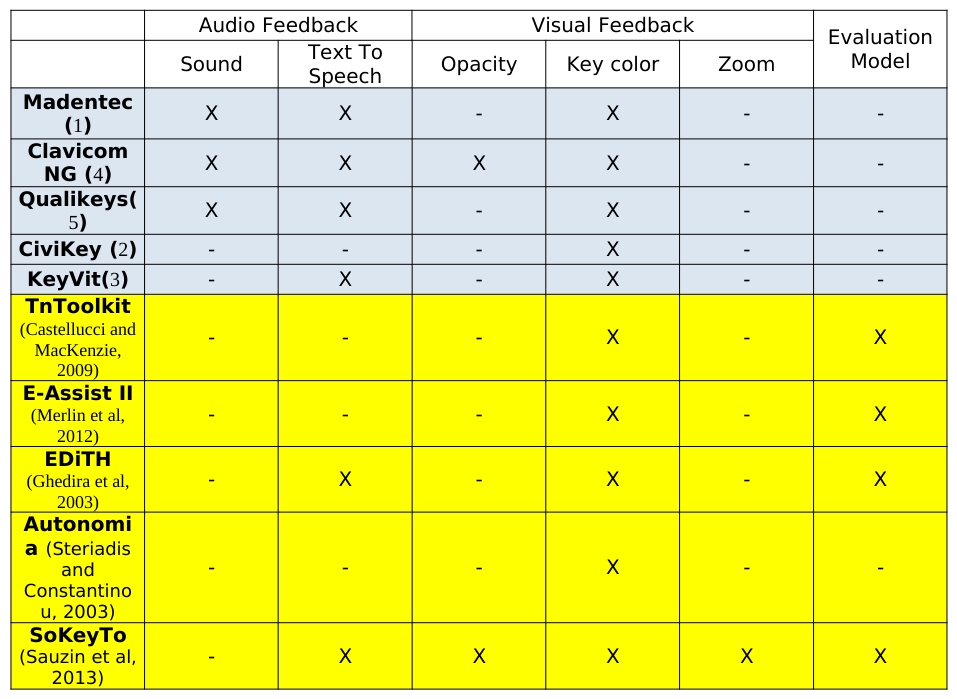
In the tables (Table 2, Table 4 and Table 5) the blue lines represent the commercial software keyboard. The yellow lines correspond to research systems. These platforms were developed to design interactive systems adapted to the skill’s users. All the commercial software keyboards are keyboards for text inputting including keys to run applications except Madenter Discover1. They also offer the possibility to design macro commands. These software keyboards have also prediction system except Madenter Discover. CiviKey2 and KeyVit3 integrate a virtual mouse controller inside the virtual keyboard (movement arrows and click simulation button). Madenter Discover, Clavicom NG4 and Qualikeys5 give a sound feedback when the key is selected. No commercial virtual keyboards has evaluation module of the text input. All these virtual keyboards are running under Windows operating systems except Madenter Discover (1) running under Mac Os. As illustrated in the Table 4, the three main interaction techniques (key selection with pointing, delayed clicking and scanning) are available.
Five research toolkits have been identified from the review of the ACM (CHI, ASSETS conference), IEEE library and Journal on rehabilitation and Disabilities. (Castellucci and MacKenzie, 2009) proposed TnToolkit a design and analysis tool for ambiguous, QWERTY, and on-screen keypads. (Merlin et al, 2012) developed E-Assist II: it is a design and evaluation platform to help researchers and clinicians to create new soft keyboards and to evaluate new or existing soft ones. The E-Assist II platform proposes a Software Development Kit and a simple Extensible Markup Language (XML) to develop complex soft keyboards. It also provides a set of tools to perform theoretical and experimental evaluations. The software keyboard generated through the E-Assist II is automatically adapted during the text inputting. They integrated a prediction system, and software keyboards can be assessed by theoretical 1 Madentec Discover, http://healthproductsforyou.com/p-19919-madentec-discover-envoy-switch-and-keyboard-access-software.html 2 CiviKey, http://www.civikey.fr 3 KeyVit, http://www.jabbla.com/products.asp?itemID=26t 4 Clavicom NG, http://www.icomprovence.net/?ClavicomNG 5 Qualikeys, http://qualikey.software.informer.com/ Ergonomics In Design, Usability & Special Populations I (2022) models (Soukoureff et al, 1995). The EDiTH (Digital Teleaction Environment for People with Disabilities), (Ghedira et al, 2003) system is a software package integrating various functionalities for assistance in communication and control of a multimedia environment. The authors proposed a model of man-machine interaction applied to the scanning based communication devices. Their goal was to adapt the scanning time based on an analysis of the data recorded in “log files” of the EDitH use. (Steriadis and Constantinou, 2003) have developed the “Autonomia” application to assist a quadriplegic person in using an ordinary personal computer. Autonomia was designed to be used through mouse and keyboard simulation through the use of specially designed “wifsids” (Widgets For Single switch Input Devices) for four frames (Cursor frame, Virtual keyboard frame, Console frame and Macros frame). Additional functionalities are also possible like dial-up connections, phones calls, etc. The SoKeyTo v2 toolkit (Sauzin et al, 2013) is the result of brainstorming sessions, review of related works (Castelluci and MacKenzie, 2009), (Merlin et al, 2012) and test of Clavicom NG(4) and CiviKey (2) environments. The SoKeyTo v2 is a complete tool: it enables to design, generate and evaluate software keyboards. The evaluation process is an integral part of SoKeyTo; then it is possible to measure the impact of the layout on speed rate, for example, at each design step of virtual keyboard. SoKeyTo v2 also allows the management of multi-layer of software keyboard; each layer could be customized. The SoKeyTo v2.6 integrates the scanning as interaction technique.
The following section will successively describe the action of keys, the types of functionalities, the interaction technique, the morphological characteristics and the feedback of ten software keyboards and platforms. We define action as the result of the selection of a key.
The key’s action
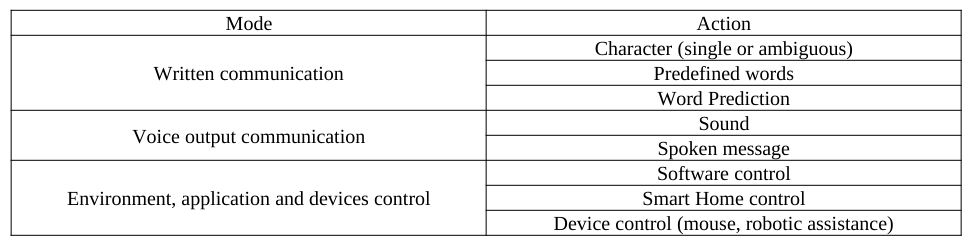
Table 1: Relation between the functions of the key and the corresponding actions Mode Action
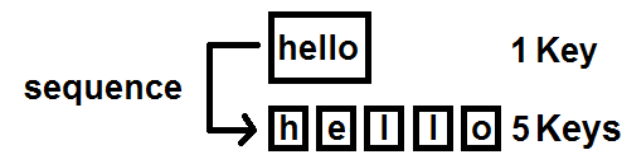
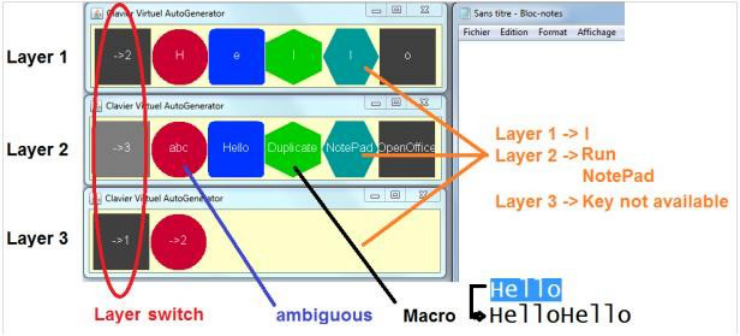
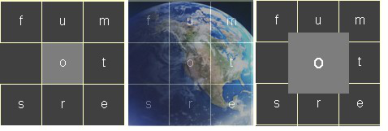
The Table 1 proposes to classify the assistive devices in three modes: written communication, voice output communication and control devices. In the virtual keyboard several actions can be linked to a key: a character, a predefined word or a word predicted by a word prediction system. The Figure 1 illustrates the two modes available to input the word “Hello”: the first one consists in entering consecutively the sequence of the five letters or by pressing the key corresponding to the word “Hello”. Reducing the number of actions to text input a message could increase the speed rate (Abascal et al, 2003), (Boissière et al, 2012) and reduce the cognitive and motor fatigue for motor impaired people (Niemeijer, 2005). With mobile phones new generations of virtual ambiguous keyboards appeared (Castelluci and Mackenzie, 2003). To each key is associated several letters. The principles to text input the letter depends on the position of the letter (Figure 2). For voice output communication keyboard, two types of actions are possible: a numeric sound or a spoken message by means of a text-to-speech system. Several reading options are available: character by character, word per word or sentence. In the end, the control interfaces can launch applications, command home sensors or devices like a virtual mouse (2 ,3), (Steriadis and Constantinou, 2003) or virtual interface of a robot arm (Vigouroux et al, 2014).
Figure 1. Two modes for text input Figure 2. Principle of ambiguous keys
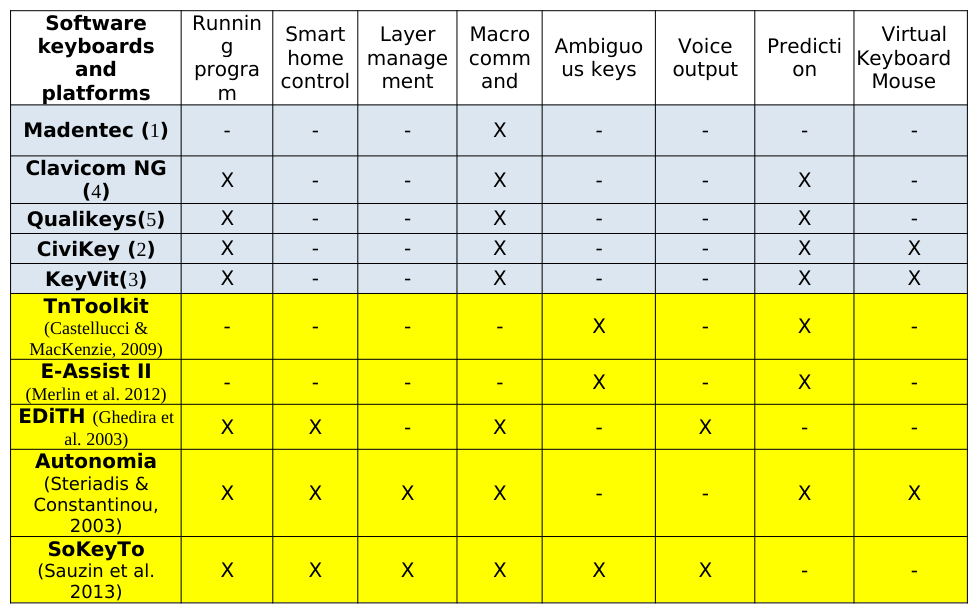
The Table 2 illustrates the type of functions linked to the keys. Most systems have the running program and macro- commands as features, except the TnToolkit and the E-Assist II applications. The “ambiguous” key is only available for the applications dedicated to the text entry. Only the two applications (EiITH and SoKeyTo) offer the functionality of the voice output communication. This option is essential for subjects having spasticity, dystonia, ataxia or dyskinesia affecting the upper limb that can interfere with the use of assistive devices. The Table 2 shows that the Autonomia and the SoKeyTo are the most complete environments. They have both Smart home control and layer management as features. This last feature allows switching from one layer to another layer. Then it is possible to associate a function with each level of a layer. The “Matthieu” interactive system described below is an example (Figure 7). The Civikey and the KeyVit keyboard as well as the Autonomia application have the virtual mouse as functionality. This functionality could be efficient for subjects with motor impairments. Only three of them (EDiTH, Autonomia and SoKeyto) permit the interoperability to control the home environment. The interfaces designed through SoKeyTo can exchange with other Windows applications and/or home sensors through the IVY bus (Buisson et al, 2002).
Table 2: Type of functions linked to the key Runnin
Interaction technique
The Table 3 draws up an inventory of the interaction techniques available in augmentative and assistive communication systems for typing, voice input and smart home control.
Table 3: Principles of interaction technique
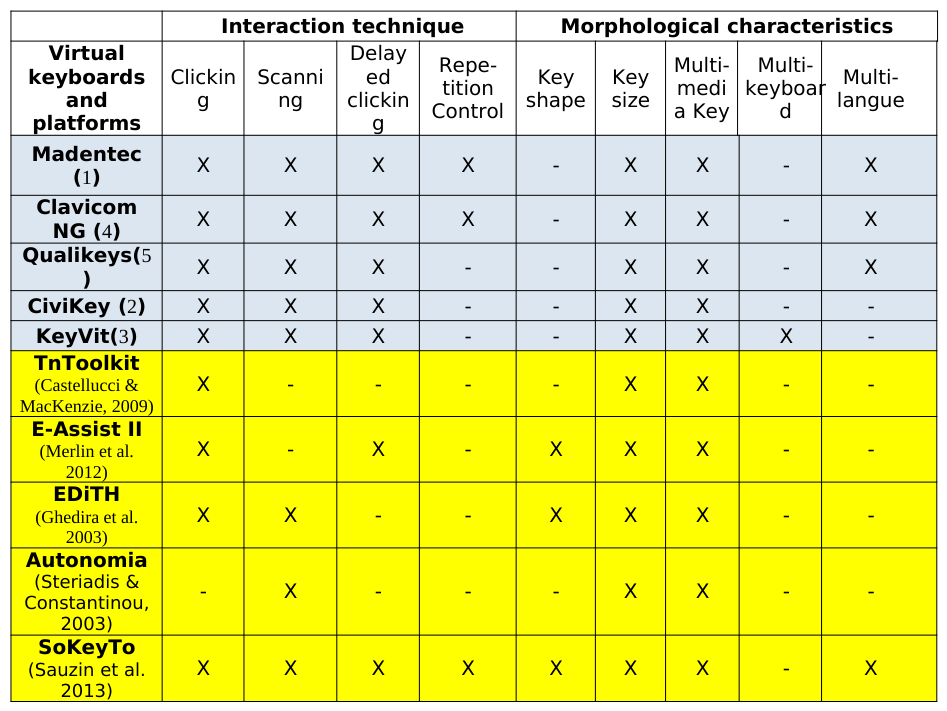
The second column describes the selection mode and the third column reports how the validation of the selection is made. These interactions techniques are independent of the physical characteristics of the devices. When the timer is equal to zero, the delayed clicking is comparable to the goal crossing technique (Wobbrock and Gajos, 2008). This technique was explored with mouse and trackballs for people with motor impairments.
All keyboards and tools provide the pointing technique except the Autonomia system which is specialized to the scanning strategy. Only two systems do not offer the scanning system. The delayed clicking is always available for commercial software keyboards. For all, it is possible to define the nature of the key: text, sound or image. All tools provide the resizing of the key.
Table 4: Interaction techniques and morphological characteristics available through the various platforms
The feedback of the user action is important information within the interactive system for person with sensory and cognitive impairment. This point is still often neglected in the design of assistive technologies. Efficient visual and/or audio feedback could be provided. The Table 5 illustrates that all the systems have implemented the change of color to identify the key selected. (Faraj et al, 2009) also proposed to enlarge the button to increase the readability of the key (Figure 4). It is a feature that was implemented in SoKeyTo. The opacity feature permits to have in background the interface system (Figure 4). This is a means to increase the information space on the screen. Only two systems provide this opacity feature.
The feedback can also be audio to know the selected key without looking at the keyboard. This feedback is useful for subject with visually impairment or attention deficits. The nature of the audio feedback can be a spoken message or a sound. It is surprising that the audio feedback is not much implemented.
In EDiTH, the user is modeled as the basis of the Model Human Processor of Card (Card et al, 1983). E-Assist II calculates the time to look for and input a character by using the model (Soukoreff and MacKenzie, 1995). The TnToolkit includes text entry performance in words per minute and keystrokes-per-character (Mackenzie, 2002). The SoKeyTo platform provides several predictive performances for text entry. A description of the laws implemented is described below in the SoKeyTo section.
Table 5: Keyboard feedback and theoretical model of evaluation Audio Feedback Visual Feedback Evaluation
SOKEYTO DESCRIPTION The SoKeyTo Platform
The design and evaluation of the SoKeyTo were a combination of field studies, interviews, participatory design prototyping, and use of anterior versions. Physicians of physical rehabilitation, occupational therapists and end users with motor impairment of the upper limbs or speech disorders, human computer interaction researchers were involved to design the SoKeyTo platform. It consists in three components: – Functions to design virtual keyboards; – Program generator of virtual keyboard from a description given in XML (eXtended Markup Language); – Metrics to estimate the performance of the virtual interfaces used to text input.
SoKeyTo functions to design virtual keyboard The basis interactive component base is the key because the SoKeyTo platform was originally developed for the keyboard design.
Pattern definition key This pattern has been developed to enable the reproduction of a key pattern. This function was defined during a brainstorming meeting with end-users to reduce the design time of a keyboard. The pattern definition of a key consists of defining: 1) the morphological characteristics of the key (color, form, spacing, textual or icon representation.); 2) the number of the layer linked to the key and finally the functionality of the key. The Table 2 shows that six types of functionalities can be defined to cover all the needs of end users. For instance, with the running program function type, it is possible to control the command of applications, with the macro command to launch web pages.
Layer level management The SoKeyTo v2.6 permits the management of three layers; each layer can be customized. The Figure 3 gives an example of a multi-layer representation which allows three ways to enter the word “Hello”.
Figure 3. Principles of some SoKeyTo functions Six types of events (Figure 3) have been designed to cover the six types of SoKeyTo functions.
– Ambiguous key: Typing on these devices, the user presses the key corresponding to the letter; – Macro command is an event queue that includes text keys, and/or keyboard shortcut of functions; for instance, pressing the “l” key will input the character “l”. Pressing the “Hello” key write “Hello”, See the writing principles described in the Figure 1; – Running program of a computer application. In Figure 1, pressing the "NotePad" key will run the "NotePad" application; – The Layer switch key changes the active layer of the keyboard. In Figure 3, pressing the key "-> 2" switch to the Layer 2. Pressing the key "l" on the layer 1 input a "l", while that corresponds to the execution of Notepad at the Layer 2; – Voice Output: The press of the key read the text message of the corresponding key. – Smart Home Control: The press of this type of key sends the command through the IVY bus which permits to interact with a sensor/device of the environment. In the future, we plan to interoperate the software keyboard between other applications, for instance a text-to-speech synthesis and a prediction system.
Interaction Configuration of the virtual keyboard Software keyboard designed by the SoKeyTo platform can also be customized. Thus, it is possible to select the interaction technique according to the user abilities: inputting with click method by pressure, delayed clicking; key repetition with a timer and the scanning. The set up interface is completely customizable by the occupational therapists or the family.
Strategies of scanning systems are generally: scan row / column or row / column. (Simpson & Koeste, 1999) and (Simpson et al, 2006) reported that the row-column scanning is not the most optimal strategy in regards to the keyboard layout. When the keyboard has a lot of keys, the scanning strategy by sub-matrix could be an alternative. (Steriadis and Constantinou, 2003) demonstrated that the theoretical average time to access to a key by a diagonal scanning is smaller. Our approach is totally different. We have defined a strategy independent of the organization in row/column of the keyboard. The principle relies on the definition of some sets of keys or final keys. Inside a set of keys, it is possible to define one sub-set of keys and some terminal keys.
The scanning strategy consists of: firstly, selecting a sub-set of keys; secondly scanning it to select the appropriate key or another sub-set of keys. Several levels of sub-sets can defined by the designer or by the occupational therapist. The SoKeyTo interface easily allows defining these sets ok keys. These sets could be linked to a semantic concept, or an application or a function type. Then it is possible to define any scanning strategy wished by the subject. Furthermore the set up of the virtual interface allows defining the speed of the scanning, the comeback strategy to start again the scanning according the status of the current item selected.
Multimodal feedback of keys has also been defined after discussion with end users and occupational therapists. These customizations (Figure 4) are: visual feedback color of the key pressed/inputted; size expanded to make the key input easier, configuration of the text-to-speech synthesis to restitute the string inputted; several options of audio feedback are available (no audio feedback, reading of character, word or sentence). Following the request of several end users, we have added the keyboard opacity to visualize. All these configurations are saved in XML files to make the customization easier.
Figure 4. Visual Feedback: Color, Opacity, Size Evaluation metrics of SoKeyTo to assess virtual keyboard
The SoKeyTo platform integrates some evaluation metrics of virtual keyboards. The Fitts’s law (Fitts, 1954) as the prediction of movement time in human-computer interfaces is considered as the reference. Several refinements to improve the theoretical and empirical accuracy of the Fitts’s law have been done: refinements including the adaptation of Fitts’ law to different population (tetraplegic, myopathy, able-bodied) have produced the Vella’s model (Vella and Vigouroux, 2013). The (Soukoreff and Makenzie, 1995) model based on the Hick-Hyman law for choice reaction time (Hick, 1952) and (Hyman, 1953). The KLM (KeyStroke Level Model) (Card et al, 1983) based on the estimation of different actions is also included. All these metrics are available on the SoKeyTo platform to assess the virtual keyboards for text input. (Vella and Vigouroux, 2013) made a validation of the Vella’s model based on Fitts’s law on several virtual keyboard layouts to prove its validity. They demonstrated that the Vella’s model is more efficient for suffering myopathy subjects than for able-bodied subjects.
KEYBOARD DESIGNED BY SOKEYTO The SoKeyTo was used to design the Annie’s keyboard and the Matthieu’s interactive system described below.
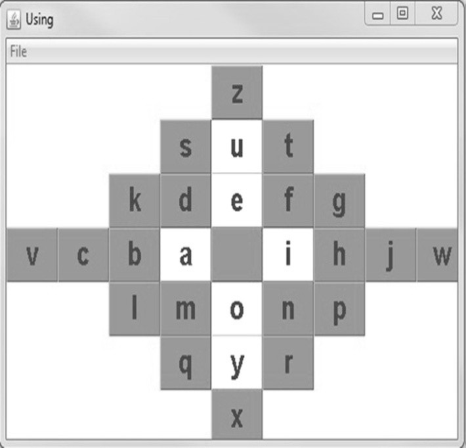
Annie’s keyboard Two digital mock-ups of the Annie keyboard were designed with the SoKeyTo environment by Annie, a disabled person suffering from myopathy. Annie is a bookkeeper; she daily uses her computer for her professional work. In the first mock-up (Figure 5) the principle was to place at the center the most frequently used characters, ordered by alphabetical order. Annie has explained this layout: her aim was to reduce as much as possible the cursor moving of the pointing device to reduce her motor fatigue.
In the second mock-up (Figure 6) Annie added letters with accents beside the letters without accents. Then she placed the punctuation symbols on the bottom of the keyboard, the function keys on top right and the numbers with the operators on the top of the keyboard. The position of the numbers on the top was chosen because Anne has more easily to move the cursor to the top of the keyboard. The “m/M” is a switch between the Annie keyboard with or without accented characters. She has also defined a key to directly access to Internet Explorer.
Figure 5. Annie keyboard without accented letters Figure 6. Annie keyboard based on Azerty Post questionnaire about the Annie keyboard
A Likert scale (strongly disagree, disagree, neutral, agree, strongly agree) was used to quantify the degree of the utility, the ease of use and memorization after one month of use.
Table 6: Response to the post questionnaire about the Annie keyboard
Table available in the original PDF paper.
Annie has strongly appreciated her keyboard. She makes a request to add a prediction system. This keyboard allows her to gain autonomy in her professional life.
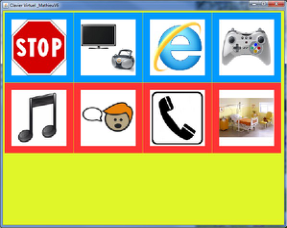
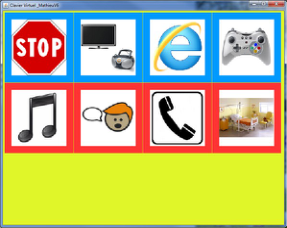
Matthieu’s interactive system The Mathieu’s interactive system was designed for a mute quadriplegic subject for communication and controlling his environment. Mathieu has visual deficiency. The characteristics (pictographic representation, interaction techniques, and sound feedback) have been iteratively defined with close collaboration with the therapists and the family. The Matthieu’s scanning system consists of 51 metaphoric pictograms. There are structured into two layouts. Eight pictograms compose the first layout (Figure 7) corresponding to TV channel, Internet movie, leisure and game, music, communication, phone call, and environment control. The pictogram interrupts the scanning. The
other 43 pictograms correspond to an action (for instance, selecting a pictogram to play a message). The pictogram represents the backward to the first level of the scanning system. The current pictogram size is width = 132 pixels and height = 132 pixels. It is wide because the patient is visually impaired he has also difficulty focusing his eyes on the screen. The visual pictogram accessibility is modifiable by adjusting the size. A switch is hooked on the Matthieu’s thumb. A double pressure on the switch is the click validation.
Figure 7. First layout of the Matthieu keyboard, rowFigure 8. First layout of the Matthieu keyboard, columnFigure 9. Second layout, Pictogram of communication scanning scanning
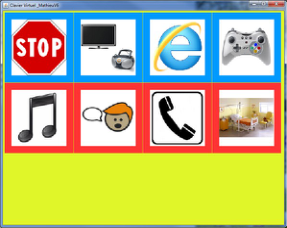
A row-column scanning is implemented: when a row is selected, the scanning is then performed column by column. The columns are scanned only once: this option is defined to avoid cognitive overload as reported by (Simpson and Koester, 1999). The (Figure 7 and Figure 8) illustrate the visual feedback implemented. The current row scanning is identified by a red border around all pictograms (Figure 7). The current column scanning is marked by a red border around the item (Figure 8). The scanning returns in row mode if there is no selected column during a first row scanning or if a column has been selected. This setting is specific for Matthieu to minimize the number of validation in the case he does a row error.
Different scanning options are also implemented to adapt the scanning to Matthieu’s abilities: 1) the scanning rate; 2) the automatic interruption scanning option. This last option is useful when a windows application is running on the screen to avoid disturbance (from instance, sound from the scanning and sound from the movie); 3) the transparency: when this option is true, Matthieu’s keyboard disappears when a windows application is running; the keyboard appears again when the user clicks somewhere in the scanning system area. An oral message description is associated to each pictogram: this message could be easily modified with the SoKeyTo. The functionalities available (See Table 2) within the SoKeyTo environment have permit to design easily the Matthieu interactive system. It was also easy to specify the different options of the scanning.
The use of SoKeyTo has easily facilitated the modification of the layout to take into account the needs of Matthieu: change for a more representative pictogram; new organization of the pictograms after trials. These modifications may be made in few seconds. Then these layouts can be tested right now during the sessions with the occupational therapists. SoKeyTo makes easier the development of communication aids.
Post questionnaire about the Matthieu’s interactive system
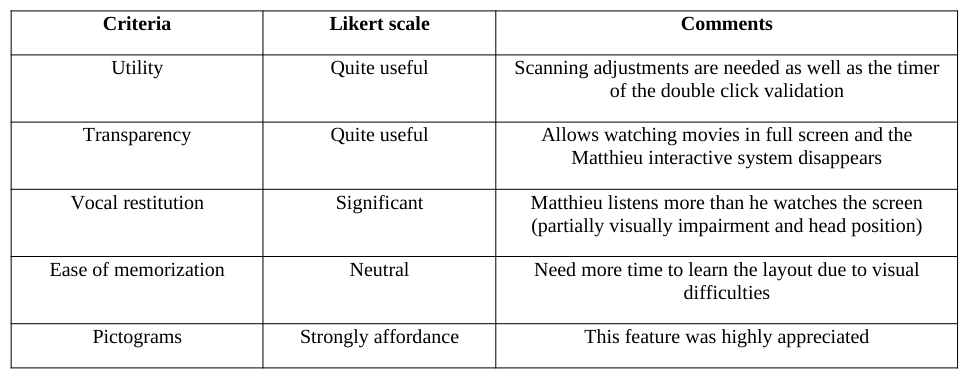
Table 7: Response to the post questionnaire about the Matthieu's interactive system Criteria Likert scale Comments
The Matthieu’s system was used during two months. During these two months a lot of redesigns have been made to meet the needs and the abilities of Matthieu. Three persons have answered to the questionnaire: Matthieu and two members of his family who learn him.
Matthieu and his family have strongly appreciated the possibility of quickly adapting the interactive system. This design has demonstrated the needs to have good representation of pictograms. The vocal restitution of the pictogram made easier the training of the Matthieu’s interactive system.
CONCLUSIONS AND PERSPECTIVES The SoKeyTo platform is an environment which offers functions to design virtual interfaces to control robotic arm, smart home and to communicate through communication devices. Firstly, we analyzed and compared SoKeyTo to other toolkits. The SoKeyTo platform offers configuration options for the interaction techniques, the design of buttons according to the needs and the abilities of the user and the multimodal feedback linked to these buttons. Then, we describe the two interactive interfaces designed by means of the SoKeyTo. Finally responses from first trials conducted with two persons with motor impairment are discussed. These first uses have shown thatSoKeyTo provide good functionalities to design quickly an efficient accessible and augmentative communication device. Future works will include recruiting quadriplegic and locked in syndrome subjects to demonstrate the efficiency of the SoKeyTo toolkit.
ACKNOWLEDGEMENT
The authors would like to acknowledge the The French National Research Agency for the partial financial support provided to this project (PALLIACOM Project) and the Higher Education and Research in Toulouse Midi-Pyrénées. Special thanks to Annie and Matthieu subjects.
REFERENCES
Abascal, J., Gardeazabal, L., Garay, N. (2004), “Optimisation of the selection set features for scanning text input”, in: LNCS 3118, pp. 788-795. Biswas, P. and Robinson, P., (2007), “Performance comparison of different scanning systems using a simulator”, in: Proceedings
of the 9th European Conference for the Advancement of the Assistive Technologies in Europe (AAATE’07), pp. 873-877. Boissière, Ph., Vigouroux, N., Mojahid, M., Vella, F. (2012), “Adaptation of AAC to the Context Communication: a Real Improvement for the User Illustration through the VITIPI Word Completion”, in: International Conference on Computers Helping People with Special Needs, Klaus Miesenberger, Arthur Karshmer, Petr Penaz, Wolfgang Zagler (Eds.), Springer, LNCS (Lecture Notes in Computer Science), pp. 451-458. Buisson, M., Bustico, A., Chatty, S., Colon, F.-R., Jestin, Y., Maury, S., Martz, Ch., Truillet, Ph. (2002), « Ivy : Un bus logiciel
au service du développement de prototypes de systèmes interactifs », .in : Interaction Homme-Machine (IHM 2002), ACM Press, pp. 223-226. Card, S.K., Moran, T.P., and Newell, A. (1983), “The Psychology of Human-Computer Interaction”, L. Erlbaum Associates Inc. Hillsdale, NJ Castellucci, S.J., MacKenzie, I.S. (2009), “TnToolkit: A Design and Analysis Tool for Ambiguous, QWERTY, and On-Screen
Keypads”, in: ICS’09, pp. 55-60. Faraj, K.A., Mojahid, M., Vigouroux, N. (2009), “BigKey: A Virtual Keyboard for Mobile Devices”, in: HCI International, Springer-Verlag, pp. 3-10. Fitts, P.M. (1954), “The information capacity of the human motor system in controlling the amplitude of movement”, in: Journal
of Experimental Psychology, volume 47 No. 6. pp. 381-391. Ghedira S., Pino P. and Bourhis G., (2003), “Conception and Experimentation of a Communication Device with Adaptive Scanning”, in: ACM Transactions on Accessible Computing, Volume. 1, No. 3, pp. 87-118. Hick, W.E. (1952), “On the rate of gain of information”, in: Quarterly Journal of Experimental Psychology Volume 4 No. 1, pp.
11-26. Hyman, R. (1953), “Stimulus information as a determinant of reaction time”, in: Journal of Experimental Psychology Volume 45 No. 3, pp. 188-196. Koester H. and Levine, S., (1994), “Modeling the speed of text entry with a word prediction interface”, in: IEEE Trans. Rehabilit.
Eng. Volume 2, No. 3, pp. 177-187. Lesher, G.W., Higginbotham, D.J., Moulton, B.J (2000), “Techniques for automatically updating scanning delays”, in: Proceedings of the RESNA Annual Conference, pp. 85-87 Lesher, G.W., Moulton, B.J., Higginbotham, D.J. (1998), “Techniques for augmenting scanning communication”, in:
Augmentative Alternative Commun 14, pp. 81-101. MacKenzie, I. S., (2002), “KSPC (keystrokes per character) as a characteristic of text entry techniques”, in Proceedings of the 4th International Symposium on Mobile Human-Computer Interaction, Berlin: Springer-Verlag, 195-210.
Merlin, B., Raynal, M., Fülber H . (2012), “E-Assist II: A platform to design and evaluate soft-keyboards” in: CHI’12, Workshop on Designing and Evaluating Text Entry Methods, in press. Niemeijer, D., In memoriam of Bérard, C. (2005), “Striving for effort reduction through on-screen keyboard word prediction”,
in: Assistive technology: from virtuality to reality - 8th European conference for the advancement of assistive technology in europe (AAATE 2005). Raynal, M., Vigouroux, N., (2005), “Genetic Algorithm to generate optimized soft Keyboard”, in: 1st Int. Conference For Human-Computer Interaction (CHI 2005), pp. 1729-1732. Sauzin, D., Vella, F., Vigouroux, N., (2013), “SoKeyTo V2: A Toolkit for Designing and Evaluating Virtual Keyboards”, in:
European Conference for the Advancement of Assistive Technology in Europ (AAATE 2013), pp. 939-945. Sanger, T. D., Henderson, J. (2007), “Optimizing assisted communication devices for children with motor impairments using a model of information rate and channel capacity”. IEEE Trans. Neural Syst. Rehabilit. Eng. Volume 15, No. 3, pp. 458-468. Simpson, R.C., Koester, H.H., Lopresti, E. (2006), “Evaluation of an adaptative row/column scanning system”. Technol.
Disability Volume 18, pp. 127-138. Simpson R.C., Koester H.H., (1999), “Adaptive one-switch row-column scanning”, in: IEEE Transactions on Rehabilitation Engineering, Volume 7, pp. 464-473. Soukoreff R. W., MacKenzie I. S., (1995), “Theoretical upper and lower bounds on typing speed using a stylus and soft
keyboard”, in:. Behavior & Information Technology, Volume 14, pp. 370-379. Steriadis, C.E., Constantinou, P. (2003), “Designing Human-Computer Interfaces for Quadriplegic People”, in: ACM Transactions on Computer-Human Interaction, Volume 10 No. 2. pp. 87-118. Vella, F., Vigouroux, N. (2013), “Validation of Fitts’ law adapted for upper limb motor impairment on software keyboards”, in:
European Conference for the Advancement of Assistive Technology in Europ (AAATE 2013), Volume 33, pp. 500-505. Vigouroux, N., Sauzin, D., Vella, F., Petit, C., Leynaert, V., Alecki, M., Fattal, C., (2014), “Software interfaces of the Jaco robotic arm: results of a focus group”, in: Proceedings of the 5th International Conference on Applied Human Factors and Ergonomics AHFE 2014. Wobbrock, J. O. and Gajos, K. (2008b), “A comparison of area pointing and goal crossing for people with and without motor
impairments”, in: Proceedings of the 9th international ACM SIGACCESS conference on Computers and accessibility, ASSETS’07, pp. 3-10.
LISTED IN THE AHFE DIGITAL BOOKSTORE CATALOGUE
Explore the complete digital volume
Advances in Ergonomics In Design, Usability & Special Populations: Part I
Read this individual research paper free through the original publisher, or explore the full digital proceedings book.
ISBN 978-1-4951-2106-7
Explore this ISBN in the AHFE Bookstore ↗Listed in the July 2026 bookstore catalogue; search by ISBN to confirm current availability · Digital book purchase optional