Alexander Steinmetz, Marcel Saager, Jan Patrick Osterloh (2025). State Based HMI Prototyping for Designing Adaptive HMIs. In: Human Systems Engineering and Design (IHSED2025): Future Trends and Applications. AHFE Open Access, vol. 198, pp. 170–180. https://doi.org/10.54941/ahfe1006773
The growing use of autonomous systems is leading to a significant change in the role of humans in technical processes. Instead of being directly involved in control and interaction, humans are more and more responsible for supervising and monitoring automated operations. This transformation is particularly evident in safety-critical domains such as maritime transport, where remote operation technologies are being implemented. Ships are no longer steered directly from the ship itself, rather they are monitored remotely by operators located in dedicated Remote Operation Centres [1].However, this new form of human–system interaction brings several challenges. As human operators are only required to intervene in special cases, they may become cognitively underloaded. Combined with monotony and potential night shifts, this can result in classic human factors issues such as fatigue, reduced attention and poor situational awareness. These factors can have serious consequences in safety-critical contexts.To minimize the risk of human errors, it is it is essential to keep the human "in the loop" and to provide specific support by designing adaptive HMIs. HMIs that adapt to task demands and user states can ensure that operators receive the appropriate information for their current workload. This requires a well-designed dialogue between humans and technology that can adapt dynamically to changing operational conditions.Against this background, the present study investigates how existing HMI design methods can be extended to incorporate different user and system states during the design phase. Current tools, such as Figma and the “KnOwledge eNrichEd CreaTive” HMI design Method (KONECT-Method) [2], do not systematically address the varying states of systems and users in the design process.This paper presents the conceptualization, development and prototypical integration of a user state framework into the KONECT HMI design tool. The first part of the paper outlines the motivation and problem definition, using workload as an example of a user state. This is followed by a review of current HMI design methods supporting adaptivity. The paper then details the selection and analysis of the KONECT method, presenting the extension that was implemented to enable user state modelling. Following this, the usability of the extended tool is evaluated in relation to common challenges such as overload and underload, and their implications for HMI design.Finally, the results are discussed and future research directions are outlined.[1] Seafar, „Operating vessels from shore control center,“ https://seafar.eu/services/, Date 16.06.2025.[2] M. Saager, A. Steinmetz, J-P. Osterloh, A. Naumann, A. Hahn, „Ensuring Fast Interaction with HMI´ s for Safety Critical Systems-An Extension of the Human-Machine Interface Design Method KONECT”, Intelligent Human Systems Integration (IHSI 2024)
The growing use of autonomous systems is leading to a significant change in the role of humans in technical processes. Instead of being directly involved in control and interaction, humans are more and more responsible for supervising and monitoring automated operations. This transformation is particularly evident in safety-critical domains such as maritime transport, where remote operation technologies are being implemented. Ships are no longer steered directly from the ship itself, rather they are monitored remotely by operators located in dedicated remote operation centers (Seafar, 2025).
However, this form of human-system interaction brings several challenges. As human operators are only required to intervene in special cases, they may become cognitively underloaded. Combined with monotony and potential night shifts, this can result in classic human factors issues such as fatigue, reduced attention and poor situational awareness. These factors can have serious consequences in safety-critical contexts.
To minimize the risk of human errors, it is essential to keep the human “in the loop” and to provide specific support by designing adaptive HMIs (Human-Machine Interface). HMIs that adapt to task demands can ensure that operators receive the appropriate information for their current workload. This requires a well-designed dialog between humans and technology that can adapt dynamically to changing operational conditions.
State Based HMI Prototyping for Designing Adaptive HMIs 171
Against this background, the present study investigates how existing HMI design methods can be extended to incorporate different user and system states during the design phase. Current tools, such as Figma, Balsamiq, or the “KnOwledge eNrichEd CreaTive” HMI design Method (KONECT-Method) (Harre, 2019), do not systematically derive the varying states of systems during the design process. The benefits of having such a systematic model- based approach is the enhanced traceability and explainability of design decisions, which also supports the evaluation of HMI design decisions in early design stages. This leads to the research question: “How can a state- based HMI prototyping approach be utilized to enhance the model-based development and early evaluation of safety critical HMIs?”
This paper presents the conceptualization, development and prototypical integration of a state-based design framework into the KONECT HMI design tool (Saager et al., 2022). The first part of this paper outlines the motivation and problem definition. This is followed by a review of current HMI design methods. The paper then details the analysis of the KONECT-Method, presenting the extension that was implemented to enable state modelling. Following this, the usability of this extension is evaluated in a usability study. Finally, the results are discussed and future research directions are outlined.
STATE OF THE ART Many tools like Sketch, Adobe XD, Balsamiq or Proto.io support GUI design and prototyping, but focus mostly on visual design. They do not follow a user centered methodology, nor evaluate interfaces. Designers have to do it on their own. In contrast, tools like PVSio-web (Oladimeji et al., 2013), Spec# (Barnett et al., 2005) or Event-B (Hoang, 2013) allow formal analysis through annotations or modelling languages. However, they require specialized knowledge, making them impractical for everyday designer. Model based approaches using task models are more aligned with user centered design. Tools such as MARIA (Paternò et al., 2011) or UCP (Falb et al., 2006; Popp et al., 2013) use task models for model-based system design to generate human machine interface prototypes. Yet, these approaches are limited: they rely on standard UI Elements and predefine interaction, which can restrict the creative flexibility of designers.
THE KONECT-METHOD The KONECT-Method (Harre, 2019) is used to systematically derive HMIs for safety critical systems. An important goal of KONECT is that the resulting HMIs and their development process are both comprehensible and justifiable. The reason for this is that every design decision of a safety-critical HMI should be based on a plausible explanation in order to ensure an optimal HMI. To this end, KONECT forces the developers into a so-called “guided creativity”by ensuring through design guidelines how various visual elements of an HMI can be implemented in the best possible way. However, the actual presentation of the elements, how they are drawn, remains in the hands of the developers. This gives KONECT an advantage over other design
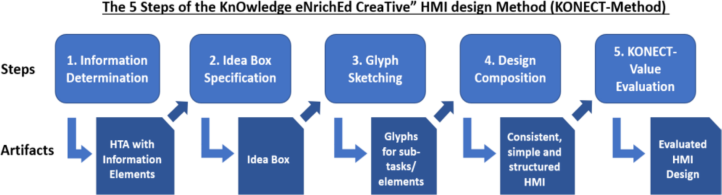
methods such as Design Thinking (Grots and Pratschke, 2009) or MBUID (Meixner et al., 2011), which give significantly more leeway during the development process, but the quality of the result depends heavily on the expertise of the developers. The KONECT-Method consists of five sequential steps (Figure 1), which result in an HMI prototype designed for safety-critical systems.
Figure 1: KONECT steps (adapted from (Harre, 2019)).
To use KONECT, the German Aerospace Center (DLR) is developing a digital tool that optimizes and partially automates the steps of the method (Saager et al., 2022). This reduces the effort involved in the original manual application of the method. For this reason, the focus of this paper is on the direct integration of a state system into the KONECT tool and not into the original method (Harre, 2019). The five KONECT steps are briefly explained below.
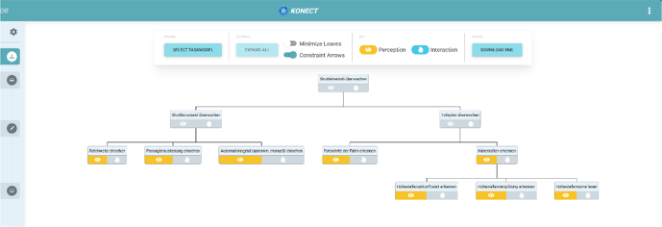
Information Determination At first, the Information Determination is used to identify and group the relevant information that the HMI should represent. This is done through a hierarchical task analysis (HTA) that must be carried out by the developers. By doing this, relevant tasks and the required system information are derived (Figure 2).
Figure 2: Task analysis example in the HTA-Editor of the KONECT tool.
State Based HMI Prototyping for Designing Adaptive HMIs 173
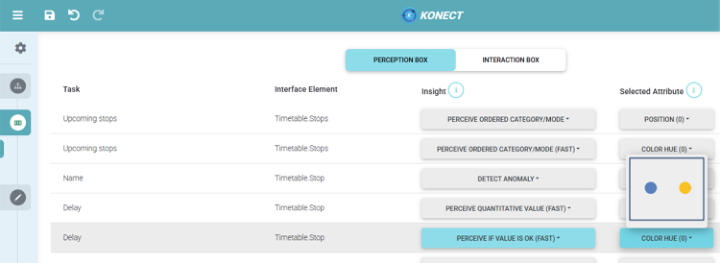
Idea Box Specification The Idea Box Specification lists all relevant system information defined in the previous step as entries in a table, the so-called Idea Box, and then assigns them to visual attributes (Figure 3). To do this, a developer assigns one or more insights to each piece of information listed (referred to as tasks in the tool). Each insight describes how the respective information should be understood/perceived by the user. For this, KONECT provides an insight catalog from which a developer can freely select an appropriate insight. Once an insight has been selected, KONECT provides a scientifically based suggestion as to which visual attribute can best be used to graphically implement the respective information.
Figure 3: Idea box example with the entries from the information determination and the assigned insights and visual attributes.
Insight-Example: The Information Determination has shown that a user must be able to recognize whether a shuttle’s arrival at a location is delayed. To achieve this, the developer selects the “perceive if value is okay (fast)” insight from the insight catalog dropdown menu (Figure 3). He chooses this insight because the shuttle is either delayed (the “value” is not okay) or it is punctual (the “value” is okay). KONECT then suggests to use a color change (“color hue”) as a visual attribute to display this information (e.g. if the shuttle is delayed, the developer could change the color of the respective interface element to red).
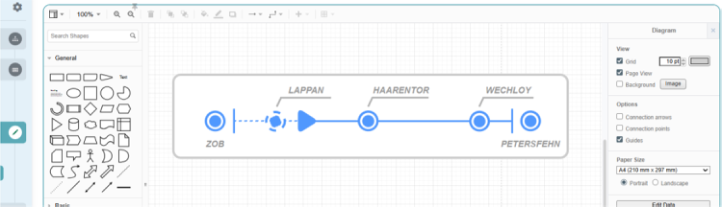
Glyph Sketching As soon as the visual attributes of all the information presented in the HMI have been defined in the Idea Box Specification, prototypical glyphs are created. Glyphs are elements that combine the previously identified information in a visually coherent form. In order to define which glyph provides which information, the Information Determination can be used as a guide, as it usually already contains a meaningful grouping of the HMI elements by the task hierarchy. These groupings can also automatically be suggested by the KONECT tool. As soon as it has been decided which glyph contains which information, the glyphs can be sketched as a prototype
with the tool’s drawing editor (Figure 4). While drawing a glyph, the visual attributes that are suggested by the Idea Box should be used.
Figure 4: A glyph for monitoring a shuttle’s timetable in the drawing editor.
Design Composition In the Design Composition, all previously created glyphs are merged into a complete HMI. The developer is also given a list of KONECT design rules to ensure that the developed HMI is consistent, reduced to the essentials and as efficient as possible in its operation. Violations of these design rules will have a negative impact on the evaluation of the HMI during the next step.
KONECT-Value Evaluation In addition to HMI development, KONECT also enables the evaluation of an HMI. For this purpose, the method calculates the so-called KONECT-Value, which indicates how “good” an HMI is. The KONECT value is made up of the previously selected visual attributes and the violations of the design rules identified by the user during the Design Composition. In addition, the KONECT Value enables the evaluation of existing HMIs. For this purpose, the KONECT steps are carried out as usual, whereby the result must reflect the existing HMI that is evaluated.
EXTENSION OF KONECT FOR STATE-BASED HMI PROTOTYPING In this section the extension of the KONECT tool to include a state system is explained. In its current state, KONECT does not support a systematic approach for modeling system states and their impact on the HMI. For the purpose of this work, the state system is not seen as an automaton as in the classical sense, but purely as semantic description of possible states (e.g. one state could be: “the remaining range is critical”) and their visual representation in the HMI. Generally, it is the aim to integrate the state system as natively as possible into the existing steps, in order to not unnecessarily increase the tool’s complexity. For each step, the initial concept and the subsequent actual implementation is described.
Information Determination Extension No extensive changes to this step are necessary, as the relevant system states can already be derived from the task analysis. They should be listed separately however and, if avoidable, not included in the task diagram. The reason for
State Based HMI Prototyping for Designing Adaptive HMIs 175
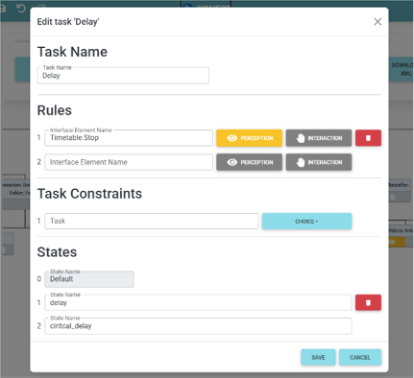
this is that a direct integration of different states as annotated tasks quickly results in a complex and confusing task diagram. To implement this concept, a separate task editing window has been implemented into the HTA-Editor. In this window, in addition to general editing options, relevant states can be added (Figure 5). It should be noted that there is always a default state that reflects the normal operation of the system (i.e. no critical situation is present). In Figure 5, the delayed shuttle arrival at a location has to be indicated in a timetable. In the context of the use case, the relevant states developed are the default state (no delay), a short delay (“delay”) and a long delay (“critical_delay”) and were created accordingly (in reality there could be significantly more states, this is just an example).
Figure 5: Editing window for creating states during the information determination step.
Idea Box Specification Extension The initial plan was for developers to be able to create different Idea Box variants, each of which is responsible for the different states. The reason for this is that alternative insight and attribute assignments depending on the system state were not possible with the current KONECT tool. For this purpose, developers were supposed to define an Idea Box as the “default box” for the initial system state. Variations could then have been created for the all the different states (“variation boxes”) based on this “default box”. However, this plan was discarded after a few attempts, as the added value could not cover the resulting increase in complexity of the tool. The reason for this was that the entries in the Idea Box generally do not change over the various states and if they do, these changes can already be considered by adjusting the previously performed task analysis.
Glyph Sketching Extension The concept of the various Idea Boxes based on the different states is continued in the Glyph Sketching: Each glyph has a default representation and variations for each relevant state, based on the glyph’s default
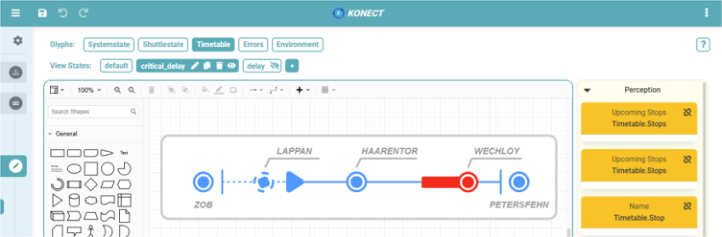
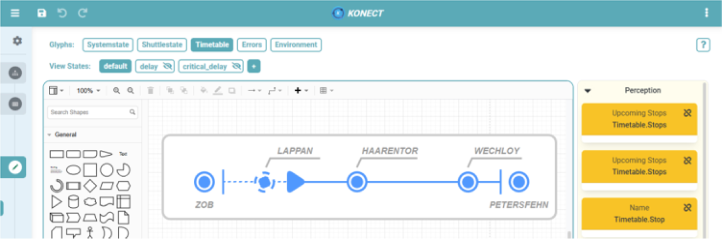
representation. For this purpose, the drawing editor had to be extended, so that the glyphs and their changes depending on the different states can be drawn. Figure 7 shows the prototype of the timetable glyph in its default state. The two states “delay” and “critical_delay” (Figure 6) were automatically taken from the Information Determination. By clicking on a state, it is considered active and any changes to the HMI prototype are saved in it. An exception to this is the default state; it always contains the initial representation of a glyph. The visualization of all other states is based on the default state. As each state only contains the actual changes made to the glyph and is not a full copy of the default state, it is also possible to activate several states at the same time and thus visualize a wide variety of state combinations.
Figure 6: The timetable glyph in its default state.
As the “drawn” glyphs are stored in a data model, the tool is also able to create an association between the various entries from the Idea Box and the drawn interface elements. For this purpose, the Idea Box entries (listed as the orange cards on the right-hand side of the drawing editor in Figure 7 and Figure 6) can be dragged and dropped onto the drawn glyph elements. In this way, the tool knows which element belong to which Idea Box entry and can later carry out an automated evaluation of the developed prototype.
Figure 7: The timetable glyph in its critical delay state.
Design Composition Extension Since the Design Composition is used to arrange the glyphs into a complete HMI, the KONECT tool must allow the developer to position the glyphs
State Based HMI Prototyping for Designing Adaptive HMIs 177
dynamically depending on their states. The selection of the respective states should be based on the previous steps for consistency. This concept could already be fulfilled by the extension of the drawing editor for sketching glyphs. The reason for this is that the extended drawing editor already allows the dynamic arrangement of glyphs depending on their states. However, since an entire view of the HMI is required for the Design Composition (only individual glyphs are considered during the Glyph Sketching), a mode has been implemented in which all drawn glyphs can be arranged into an entire HMI. With this mode it is also possible to define so called global states that can freely combine any of the available states and thus can display any situation of the entire system.
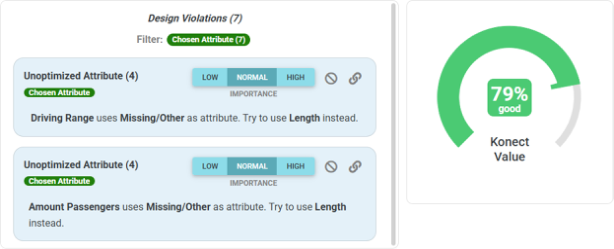
KONECT-Value Evaluation Extension Since the original KONECT value does not consider both the states and the general arrangement of an HMI, these must be considered during the calculation. To do this, the design violations must be determined for each state and then included in the KONECT Value. The data model of the previously created HMI sketches can be used for this purpose. It enables the automatic identification of design violations and the calculation of the KONECT-Value. This works because the model describes the visual properties of the drawn elements (positions, shapes, colors, etc.) and maintains a direct association with the entries in the Idea Box (by drag-and-drop in the previous step). This allows the tool to perform an automated comparison between the visual attributes selected in the Idea Box and the actual graphical implementation. To achieve this, the calculation implementation of the KONECT value has been extended so that all defined states are considered and the design violations can be automatically identified and listed (Figure 8). If the tool incorrectly identifies or incorrectly weights a violation, it is also possible to adjust it (or remove it if necessary). Some of the design guidelines specified by KONECT have already been formalized and implemented as evaluation functions for this purpose.
Figure 8: Violations of the KONECT design guidelines are automatically identified by the tool and are factored into the KONECT value.
EVALUATION A usability study was carried out to validate the extension of the KONECT- Method. In addition to analyzing the functionality and user-friendliness of the KONECT extension, errors and possible improvements were identified.
A total of eight people took part in the study on different dates (including a pilot study). During the study, the participants were observed and were able to contact the experimenter in the event of general comprehension problems. All but two participants had previously worked with KONECT, but all were given a brief introduction into the Method. The subjects’ task was to design parts of a remote shuttle monitoring HMI (parts of which can be seen in Figure 7 and Figure 6) and its possible states with the KONECT extension. At the end of the study, the participants had to complete a post-test questionnaire. This questionnaire contained general questions about the method and a SUS test (System Usability Scale) (Brooke, 1995), with which the usability and user-friendliness of the extension could be quantified. The evaluation of the SUS test resulted in an average value of 85.7 ± 10.4 (min. 67.5 | max. 97.5). This value indicates a good applicabil- ity/usability of the KONECT extension (Bangor et al., 2009). The relatively high standard deviation of 10.4 can be partly attributed to the fact that the SUS value of participants who had intuitively used the state system correctly was significantly higher compared to participants who had initially expected the system to behave differently. However, once the participants had understood how the state system worked, they had no problems using it. This suspicion is reinforced by the fact that one of the most frequent suggestions for improvement was the desire for a tutorial for the state system. Other suggestions for improvement included, for example, the clarification of state hierarchies, i.e. a visualization of whether a state is based on the default state or is a copy of another state, and other quality of life functions such as a color pipette for the drawing tool, which can be implemented with relatively little effort.
Overall, the results indicate good functionality and usability of the extended KONECT-Method. As the study is a usability study, the final HMI results of the test subjects were not validated with this study, but can be done in future. However, it is also not mandatory, as the extension is mostly an optimization of the KONECT process itself and not a modification of the final results produced.
CONCLUSION
This paper describes the extension of the KONECT tool with which the adaptive components of an HMI can be systematically derived and drawn. For this purpose, a concept was developed, implemented and validated in a usability study. The implemented state system uses a model-based approach and by this enhances the traceability and explainability of design decisions and enables the automatic evaluation of early design prototypes. In a continuation of the work, the feedback from the study will be implemented and the missing evaluation functions that are needed for a complete automatic HMI evaluation (based on KONECTs design rules) will
State Based HMI Prototyping for Designing Adaptive HMIs 179 be implemented. The state system also opens up the possibility to implement variables. Variables would function similarly to states, but HMI elements could interpolate their appearance based on the value range of a variable (i.e. a bar would grow proportionally to the defined variable, for example). This would make it possible to design HMI prototypes with which not only explicit states can be visualized, but any interpolated state between those states. The system also lays the foundation to implement the logical chaining of states in the form of classical state automata. This would extend the current purely visual interconnection of states to include logic patterns so that complex click prototypes can be created. As the HMI prototypes created with the extension are based on a data model, it is also possible to have these data models operated by a executable human model. This would allow further parameters such as mental workload or situational awareness to be observed at runtime.
ACKNOWLEDGMENT This work has received funding by the KoKoVI project of the German Aerospace Center (DLR) and from the Federal Ministry for Economic Affairs and Energy (BMWE) in the LUFO-6 programme under grant number 20D1908D.
REFERENCES Bangor, A., Kortum, P. and Miller, J. (2009) ‘Determining what individual SUS scores mean: Adding an adjective rating scale’, J. Usability Studies, vol. 4, no. 3, pp. 114–123. Barnett, M., Leino, K. R. M. and Schulte, W. (2005) ‘The Spec# Programming System:
An Overview’, in Barthe, G. (ed) Construction and analysis of safe, secure, and interoperable smart devices: International workshop, CASSIS 2004, Marseille, France, March 10 - 14, 2004; revised selected papers, Berlin, Heidelberg, Springer, pp. 49–69. Brooke, J. (1995) ‘SUS: A quick and dirty usability scale’, Usability Eval. Ind., vol. 189. Falb, J., Kaindl, H., Horacek, H., Bogdan, C., Popp, R. and Arnautovic, E.
(2006) ‘A discourse model for interaction design based on theories of human communication’, CHI ‘06 Extended Abstracts on Human Factors in Computing Systems. Montréal Québec Canada, April 22–27. New York, NY, USA, ACM, pp. 754–759. Grots, A. and Pratschke, M. (2009) ‘Design Thinking — Kreativität als Methode’, Marketing Review St. Gallen, vol. 26, no. 2, pp. 18–23. Harre, M.-C. (2019) Supporting Supervisory Control of Safety-Critical Systems
with Rationally Justified Information Visualizations, Dissertation, Universität Oldenburg. Hoang, T. S. (2013) ‘An Introduction to the Event-B Modelling Method’, in Romanovsky, A. and Thomas, M. (eds) Industrial deployment of system engineering methods, Berlin, Heidelberg, Springer, pp. 211–236. Meixner, G., Paternò, F. and Vanderdonckt, J. (2011) ‘Past, Present, and Future of
Model-Based User Interface Development’, i-com, vol. 10, no. 3, pp. 2–11. Oladimeji, P., Masci, P. M., Curzon, P. and Thimbleby, H. W. (2013) ‘PVSioweb: A tool for rapid prototyping device user interfaces in PVS’, Electron. Commun. Eur. Assoc. Softw. Sci. Technol., vol. 69 [Online]. Available at https:// api.semanticscholar.org/CorpusID:7968625.
Paternò, F., Santoro, C. and Spano, L. D. (2011) ‘Engineering the authoring of usable service front ends’, Journal of Systems and Software, vol. 84, no. 10, pp. 1806–1822. Popp, R., Raneburger, D. and Kaindl, H. (2013) ‘Tool support for automated
multi-device GUI generation from discourse-based communication models’, Proceedings of the 5th ACM SIGCHI symposium on Engineering interactive computing systems. London United Kingdom, June 26–27. New York, NY, ACM, pp. 145–150. Saager, M., Osterloh, J.-P. and Brück, Y. (2022) ‘KONECT: Implementation and Extension of a Method for the Development of Safety-Critical Human-Machine Interaction Interfaces’, Human Factors in Software and Systems Engineering, July 24–28, 2022, AHFE International. Seafar (2025) Product - Seafar [Online]. Available at https://seafar.eu/services/
(Accessed 25 July 2025).
LISTED IN THE AHFE DIGITAL BOOKSTORE CATALOGUE
Explore the complete digital volume
Human Systems Engineering and Design (IHSED2025): Future Trends and Applications
Read this individual research paper free through the original publisher, or explore the full digital proceedings book.
ISBN 978-1-964867-74-8
Explore this ISBN in the AHFE Bookstore ↗Listed in the July 2026 bookstore catalogue; search by ISBN to confirm current availability · Digital book purchase optional