Cai-Ying Cheng, Chun-Chun Wei, Yang-Cheng Lin (2023). Design and Usability Evaluation of Visual Perception Game-Based Training System for Children with Developmental Delays. In: Usability and User Experience. AHFE Open Access, vol. 110, pp. 288–298. https://doi.org/10.54941/ahfe1003202
The prevalence of developmental delays is increasing year by year and is common in preschool-aged children with developmental delays, and visual impairment is a common problem in children with developmental delays. Visual development is critical to preschoolers learning. Children with visual problems often have difficulties in picture recognition, image comprehension, and memory, resulting in difficulties in daily living and learning. However, traditional paper-based training is tedious and lacking in interactivity, game training can make up for these problems. Therefore, the objective of this study was to design a visual-perceptual play training system for children with preschool developmental delays, to investigate the usability and perception of the system for children with developmental delays. In this study, the recommendations of the heuristic evaluation were iteratively designed to ensure the functionality of the system. The system will be tested with an eye-tracking device to verify its suitability for use with children with developmental delays and to further suggest considerations and limitations for future research when designing software and interfaces for children with developmental delays. The results of this study showed that the best participants focused on the correct answer and the specified pattern, while the worst participants tended to focus on irrelevant things and had high overall attention on the screen. It was found that for the preferences section of the interface, placing the specified pattern in the center of the interface or closer to the options resulted in better performance of the children's perceptual training, and clearly rewarded feedback kept them motivated to learn and less distracted. The system will continue to be optimized in the future in the hope that it will help pre-schooler’s visual cognitive learning and help parents understand their children's visual ability.
In today’s digital age 3C usage is popular, the age of using electronic produ- cts is decreasing, the use of mobile devices by preschool children is becoming more and more common, and mobile phones and tablets have become an
Design and Usability Evaluation of Visual Perception Game-Based Training System 289
integral part of most children’s lives (Kılıç et al., 2019). According to the analysis and survey results of the 2022 Taiwan Early Childhood Development Survey database, more than 90% of preschoolers aged 3 to 5 in Taiwan use 3C products, and the lower the socioeconomic status of children, the lon- ger they have access to 3C products. For children born in the Internet world, 3C products can be very proficient without deliberate learning, and even chil- dren with developmental delays who have poor cognitive abilities rarely have difficulties in operating them.
With the popularization and development of mobile devices, they are used in various fields including education, medical care, work, life, family, etc. They have even changed the learning mode of children, as learning is no longer limited to the black-and-white words in the classroom. The field of early therapy for children also combines games with rehabilitation to incre- ase children’s motivation for training through high sensory stimulation and immediate feedback. For preschoolers, training in rehabilitation as a game has a positive impact on motivation and academic performance (Linehan et al., 2014; Pellas et al., 2019).
Some research in recent years has focused on the effectiveness and differe- nces of digital game rehabilitation, but usability for children is a prerequisite for willingness to use, and if children cannot use the system effectively, it is difficult for them to learn through it (Bruckman & Bandlow, 2002). This study found that most rehabilitation games were developed without conside- ring the differences in use between children with developmental delays and typically developing children. A good mobile application for children keeps the user’s attention and makes the operation enjoyable, and the system’s arch- itecture and interface allow children to understand and learn and perform the correct actions. Although some studies have examined interactive interfaces for children, the primary user group for children’s medical training software is developmentally delayed children, and there are currently no guidelines for designing interactive digital game interfaces for children with developmental delays.
In summary, through literature review, field observations, and expert interviews, this study will provide a preliminary understanding of the reh- abilitation of children with clinical developmental delays and suggest system improvements through a heuristic assessment. The purpose of this study is to design a visual play training system for children with preschool developmen- tal delays. The system will focus on the following three points: (1) meeting the usability of children with preschool developmental delays (2) helping chil- dren’s visual skills to learn (3) helping parents to understand their children’s visual skills. The results of this study are expected to serve as a reference for future research on the development of visual-perceptual training game systems for children with delays, as well as for research on the development of interface design for children with delays.
RELATED LITERATURE The purpose of this study is to develop a visual-perceptual game training system for children with developmental delays, which requires an in-depth
understanding of developmental delays and visual perception. This section focuses on the theory and development of developmental delays and visual perception to understand the behaviors and interactions of children with developmental delays and to further design a training game for children with developmental delays by exploring and analyzing the relevant literature.
Developmental Delay in Children Developmental delay is a broad description, not a diagnosis, and is a cate- gorical and descriptive term used clinically (Levy, 2018; Mithyantha et al., 2017). Developmental delay is when a child does not reach the same level of development as other children of the same age in one or more areas of develo- pment for various reasons, mainly in children under the age of 6 (Choo et al., 2019; Khan & Leventhal, 2021; Lissauer & Carroll, 2017). There are many reasons for a child’s delay, whether it is due to a family genetic disorder or the environment in which the child grows up, as long as one of them is invo- lved, the child may have a delayed condition. Delayed development is not a condition faced by a few families, but is one of the most common disorders seen in pediatric clinics (Mithyantha et al., 2017). However, delays are not incurable and can be reduced or even caught up with children of the same age with aggressive treatment. Therefore, early detection and intervention can enhance the performance of children in all areas.
The target population of this study was preschool-age children with deve- lopmental delays, which is the most predominant group of developmental delays. In Taiwan, there are 26,392 children with developmental delays recei- ving early treatment services, with the largest number at age 2 (24.2%), followed by ages 4 and 3, an increase of 66.5% compared to 2011(Welfare, 2021). The younger the age, the higher the plasticity of the brain and early tre- atment can effectively change the developmental trajectory of the child, but often due to family or caregiver negligence and the fact that it is not easy to detect delayed conditions in young infants, as children grow older their abilities differ more and more from those of their peers. (Lissauer & Car- roll, 2017). Therefore, regular screening and developmental assessment are necessary to detect and treat problems early (Vitrikas et al., 2017).
Visual Perception Visual Perception is a process of receiving and integrating stimuli from the environment by the visual senses, and is composed of two main elements: visual reception and visual perception. Many studies have shown that visual has not only the greatest impact on learning in the early developmental sta- ges of infancy, but is also considered to be the most sensitive indicator of the central developmental process and has a profound impact on children’s lan- guage, reading, and play abilities, thus visual perception plays a significant role in children’s learning and daily life.
According to the hierarchy of visual-perceptual skill development propo- sed by Warren 1993, each visual cognitive skill must rely on the previous level
Design and Usability Evaluation of Visual Perception Game-Based Training System 291
of skill to have subsequent performance. Occupational therapists also follow this protocol to design rehabilitation programs that are appropriate for each individual patient to help children improve their visual cognitive abilities. The elements of visual cognition are described in detail below.
1. Visual Attention: Refers to the ability to receive desired messages and filter unwanted stimuli in a multisensory stimulation environment. 2. Scanning: Retrieving important information in the environment and che- cking back and forth several times to make sure it is correct when noticing important details. 3. Pattern Recognition: Recognizes the configuration and features of an object, including shape, contour, color, texture, and material. 4. Visual Memory: The ability to store the information you have seen in the brain so that it can be extracted immediately when needed.
Visual Performance of Developmentally Delayed In the preschool developmental stage of children, vision has the most influe- nce on learning, and children with good visual perception also perform better in reading, writing, and logic (Lin, 2010), and studies have also shown a strong correlation between visual ability and children’s learning, behavior, and classroom adaptability (Frostig et al., 1962);Visual impairments often lead to missed opportunities for treatment and delayed illnesses. If an obse- rved child is unable to squeeze toothpaste onto the toothbrush accurately, has difficulty putting on clothes and tying shoes, is unable to copy and read properly in class, and tends to skip words when reading, all of these beha- viors may be indicative of a visual perceptual problem (Schneck, 2005). It is recommended that evaluation be conducted at a medical institution as soon as possible, because the earlier a child’s developmental delay is detected, the more cognitive ability can be restored or even cured with active intervention.
According to the Test of Visual Perceptual Skills - Third Edition (TVPS-3), visual perception can be divided into seven skills, which are Visual Discri- mination, Visual Memory, Sequential Memory, Visual Spatial-Relationship, Form Constancy, Visual Figure-Ground, and Visual Closure. In this study, the most basic visual discrimination ability is used as the training ability of this system. Visual discrimination refers to the ability to clearly identify similarities and differences between objects. Children with poor visual discri- mination are unable to distinguish the detailed features of objects or words, and often make mistakes in holding objects or repeatedly copying similar words or symbols. (Chen et al., 2013; Schneck, 2005).
THE DESIGN PROCESS OF VISUAL PERCEPTION GAME-BASED TRAINING SYSTEM The name of this visual perceptual game training system is “X-DD Touch”, X means future and technology, DD is the abbreviation of Developmental Delay. To make the design more relevant to the clinical use and develo- pment of behaviors and preferences of children with delays, this section
will explain in detail the experimental development design process of the visual-perceptual training system X-DD Touch in this study.
Field Observation and Expert Interviews To adapt the system developed in this study to the current situation in medi- cal institutions, we conducted field observations and expert interviews before designing the X-DD Touch. In this study, we interviewed seven child occu- pational therapists whose areas of expertise included physical and pediatric occupational therapy, attention training, and social-emotional training to discuss the current status of the visual-perceptual training program and the preferences and needs of children with developmental delays to establish the functional design of the system. We concluded the following: (1) For chil- dren with developmental delays, the physician recommends starting with basic visual cognitive skills, i.e., visual discrimination training, to ensure that the child’s basic skills are fully developed. (2) Bringing in story situations during the training will give children a greater sense of immersion. In addi- tion, children will be given choices during the training, which will increase participation and improve concentration during the training. (3) Appropriate encouragement and feedback during the children’s training can better main- tain the momentum of training. (4) The system should have the rich picture and sound effects and visual data presentation. (5) Children with develo- pmental delays have poor left-right distinction performance, so the operation of the touch tablet is more intuitive for children.
Implementation Research This section describes the ideal development of the overall system and the operation of the system content.
(1) Idea Development Based on field observations and expert interviews, six design ideas were concluded:
A. Visual discrimination is used as the training ability of the system. B. The game has a rich story screen and sound effects to encourage children to operate. C. Design game roles for children to choose from to increase the sense of participation. D. Provide encouragement and reward feedback when children answer correctly to maintain training momentum. E. Recorded training data helps physicians and parents understand the child’s abilities. F. Using a touch tablet as the operating device of this system.
(2) System Contents The system screen size is 1440 × 960, using the virtual game engine Unity for system development. The system is designed for preschool-age
Design and Usability Evaluation of Visual Perception Game-Based Training System 293
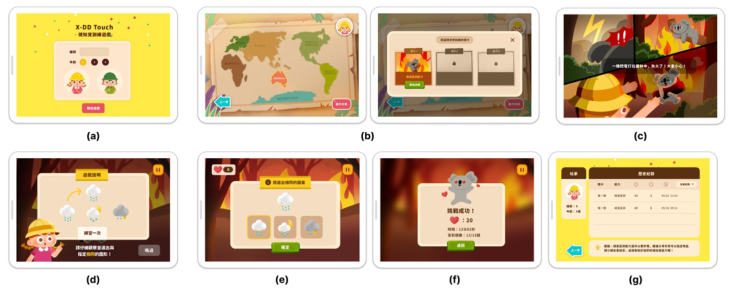
Figure 1: Overview of X-DD touch visual game training system (a) Home page (b) level selection page (c) Story page (d) Visual discrimination level explanation page (e) Visual discrimination training page (f) Ability analysis page.
children with developmental delays, so high color was chosen to attract chil- dren’s attention and to present a lively and cute style. The system design is overviewed (see Fig. 1).
A. Home Page: In the middle of the screen, the child’s number and age can be entered (see Fig. 1 (a)) to facilitate the organization and retrieval of data for the subsequent study. According to the literature, the roles in the game help children to integrate into learning, so this study designed two roles of different genders in the game for children to choose, and the roles will be the main characters of the next game to increase the sense of participation.
B. Level Selection Page: The level menu page uses the world map as the background of the level (see Fig. 1 (b)), and children travel around the world as explorers to complete tasks. Take the Australian region as an example, children need to rescue a koala trapped by a forest fire (see Fig. 1 (c)).
C. Visual Discrimination Level Explanation Page: To ensure the accuracy of the game data, the system will explain the game rules to the user before entering the formal game training (see Fig. 1 (d)). A character chosen from the home page will act as the level narrator to help children understand how to play the level. An animation was designed to loop until the user clicked the practice button once and was taken to the practice page, which was identical to the official training page of the game (see Fig. 1 (e)), thus ensuring that the children fully understood the correct responses.
D. Visual Discrimination Training Page: The main rule of the visual discri- mination level was to find the same pattern among three different patterns, with the specified pattern placed above the three shapes (see Fig. 1(e)), and to provide children with the opportunity to compare the patterns with each other. The correct or incorrect answer is indicated by clicking on the same pattern as the one specified. The top left of the screen shows the feedback, if the answer is correct, the number of hearts can be increased; the top right is the pause button, when the child feels the need to rest or can not continue to operate, click the pause button can choose to continue the game, start again or return to the main menu, the screen will show the player’s score after the level game (see Fig. 1 (f)).
E. Ability Analysis Page: After the child completes the level training, click the Ability Analysis button to go to the Training Data page (see Fig. 1 (g)). On the Data View page, users can view the history of each training session, inclu- ding “Levels”, “Training Ability”, “Number of Correct Answers”, “Number of Incorrect Answers”, and “Time Taken”. The left half of the screen shows the player’s number and age. The system will calculate the child’s poor per- formance according to the training and give suggestions to help parents and therapists understand the child’s visual ability.
Heuristics Evaluation To make the system more feasible, in this study, we conducted a heuristic evaluation with three children’s occupational therapists and three designers with experience in children’s software development and design to discuss the usability of the system at this stage, and to use this evaluation to find out the shortcomings of the system and as a basis for subsequent improvement. This evaluation led to the following four recommendations: (1) Since pre- school children’s language skills are not fully developed, it is recommended that the text be accompanied by annotations and phonetic aids to help them understand. (2) The world map on the level selection page is presented in full color, but only the Australia level is currently being developed, so it is recom- mended that regions that cannot be clicked be presented in black and white, while Australia is presented in color. (3) When children answer the correct questions on the visual discrimination page, the feedback is presented as a number. Since this feedback is not clear, it is recommended that the feedback be presented in a graphical format.
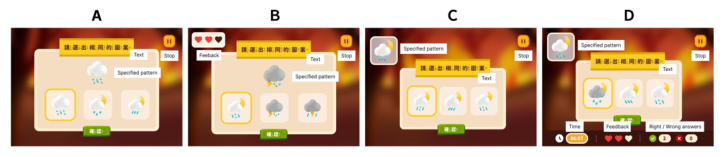
EXPERIMENTAL DESIGN: EYE TRACKING This study uses eye-tracking experiments and interviews to understand the interface preferences of delayed children for this system to design a system that matches user behavior. Since the system answers the question by sele- cting the same pattern as the specified pattern among the three patterns, the user will compare the patterns repeatedly. The system was displayed on a 10.8” tablet with four different interface presentations (see Fig. 2) and an eye-tracking device to assist in exploring the development of delayed eye movement data and preference interface for children. The experiments are described in detail as follows.
Figure 2: Four different interfaces for presentation.
Design and Usability Evaluation of Visual Perception Game-Based Training System 295
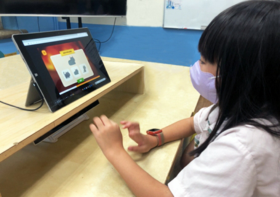
Figure 3: User testing for children using X-DD Touch.
Experimental Participants: Eye Tracking We recruited 17 preschool-aged children with developmental delays, with participants ranging in age from 4 to 7 years, with a mean age of 5.5 (SD = 1.50). All participants were diagnosed as developmentally delayed, had basic visual search, visual scanning, and visual tracking skills, were able to operate the tablet by themselves, had no difficulty with manual manipu- lation, and were able to understand physician and researcher instructions and express their thoughts. Since the participants were minors, consent was sought from the participating parents or guardians before the study was conducted.
Experimental Procedure: Eye Tracking First, the researcher explained to the children how to operate the system, fol- lowed by a paper exercise to make sure they clearly understood the operation mode of the game. Secondly, the eye-tracking device calibration procedure was performed. Third, after the calibration was completed, the children operated the tablet and completed all the questions in order (see Fig. 3), with three questions for each of the four interfaces, totalling 12 questions. Finally, a semi-structured interview was conducted to understand the chil- dren’s subjective feelings and preferences during the process. The duration of the experiment was about 15–20 minutes for each participant.
DATA ANALYSIS AND RESULTS This section will be divided into two parts for detailed descriptions: (1) Eye- tracking Data (2) The Interface Preferences of Participants.
Eye-Tracking Data Among the four different interfaces, they can be divided into two groups according to the position of the specified patterns, interface AB is the specified pattern placed in the center of the screen, and interface CD is placed in the top left of the screen. The total score of the test was 12, and the overall mean score was 10.50 (SD = 1.76), We found that there was no significant difference in the time spent by children in the four interfaces, but the correct answer rate was lower in interface CD than in interface AB, probably due to
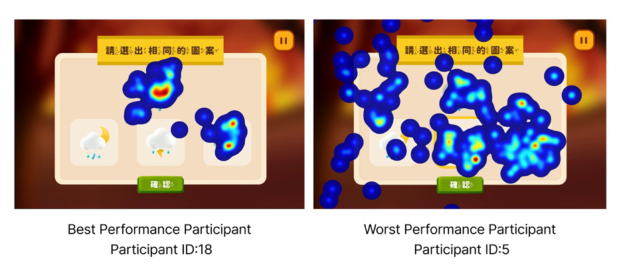
Figure 4: Heat map of the best (left) and worst (right) performing users.
the different placement of the specified patterns. When the user was confused or could not identify the correct answer, the fixation time and the number of reviews would be higher.
We further compared the heat map of the best performing user (ID = 18) and the worst performing user (ID = 5) and found that the best performing user focused on the correct answer and the specified shape, while the worst performing user had a higher overall focus on the screen (see Fig. 4).
The Interface Preferences of Participants After the experiment, we interviewed the participants to understand the chil- dren’s interface preferences. Among the four different interfaces (see Fig. 2), we found that the best participants preferred interface D, where they felt that the information provided at the bottom of the screen, such as time, rew- ard, and the number of correct and incorrect answers, provided them with an instant overview of their performance. The worse participants preferred interface B, where they felt that the reward for answering the questions would give them more motivation to continue answering the questions; Previous studies have also shown that children prefer highly interactive elements and that explicit visual and audio feedback attracts children’s attention, which makes them less likely to be distracted. (Caro et al., 2017; Game Design for Kids, 2016; Nielsen, 2010)
Besides, interface C was the least favorite inter- face among all the participants. They were bothered by the placement of the specified pattern in the upper left corner of the screen, and they felt bored by the lack of a reward mechanism for correct answers. Most of the partici- pants responded positively to the system and found it more interesting than the usual training.
CONCLUSION
The purpose of this study is to design a visual perceptual game training system for children with preschool developmental delays to help children’s visual cognitive learning and to provide parents with an understanding of their chil- dren’s visual abilities through the system. We built an initial prototype of the system through field observations and expert interviews and then iterated
Design and Usability Evaluation of Visual Perception Game-Based Training System 297
the design with recommendations from a heuristic evaluation to establish the functionality of the visual perception system. The system uses basic visual cognitive skills to start the training, so we focus on visual discrimination as the main training ability. To encourage children and keep them motivated to train, the system contains full story screens and sound effects and rew- ards users when they answer the questions correctly. Besides, we also record the user’s training data during training to help parents understand the child’s ability. After designing the visual-perceptual game training system, an eye- tracking experiment and an interface preference interview were conducted to assess the behaviors and preferences of children with developmental delays in operating the system. In the future, we will optimize the system based on the results. Noteworthy points of the system design are: (1) The specified pattern is placed in the middle of the screen to help users answer more effecti- vely. (2) The interface with an obvious reward mechanism can keep children’s motivation to train.
ACKNOWLEDGMENT
We are grateful to the 17 participants in Taiwan for their participation and assistance in the experimental study. We also thank for the research was supported by Xinhua Branch in Tainan Hospital.
REFERENCES
Bruckman, A., & Bandlow, A. (2002). Human-computer interaction for kids.
428–440. Caro, K., Tentori, M., Martinez-Garcia, A. I., & Zavala-Ibarra, I. (2017). Froggy- Bobby: An exergame to support children with motor problems practicing motor coordination exercises during therapeutic interventions. Computers in Human Behavior, 71, 479–498. Chen, Y. N., Lin, C. K., Wei, T. S., Liu, C. H., & Wuang, Y. P. (2013). The effectiveness
of multimedia visual perceptual training groups for the preschool children with developmental delay. Research in Developmental Disabilities, 34(12), 4447–4454. Choo, Y. Y., Agarwal, P., How, C. H., & Yeleswarapu, S. P. (2019). Developmental delay: identification and management at primary care level. Singapore Med J, 60(3), 119–123. Frostig, M., Lefever, W., & Whittlesey, J. (1962). Disturbances in Visual Perception. Game Design for Kids. (2016). Khan, I., & Leventhal, B. L. (2021). Developmental Delay. In StatPearls. StatPearls
Publishing. Kılıç, A. O., Sari, E., Yucel, H., O˘guz, M. M., Polat, E., Acoglu, E. A., & Senel, S. (2019). Exposure to and use of mobile devices in children aged 1–60 months. European Journal of Pediatrics, 178(2), 221–227. Levy, Y. (2018). Developmental Delay’ Reconsidered: The Critical Role of Age-
Dependent, Co-variant Development [Conceptual Analysis]. Frontiers in Psych- ology, 9. Lin, Y.-H. (2010). Influences on Children’s Visual Cognition Capabilities through Playing”Intelligent Matrix” Developed by the Augmented Virtual RealityTechno- logy
Linehan, C., Waddington, J., Hodgson, T. L., Hicks, K., & Banks, R. (2014). Designing games for the rehabilitation of functional vision for children with cerebral visual impairment CHI ‘14 Extended Abstracts on Human Factors in Computing Systems, Lissauer, T., & Carroll, W. (2017). Illustrated Textbook of Paediatrics 5th Edition
(5th ed.). Mithyantha, R., Kneen, R., McCann, E., & Gladstone, M. (2017). Current evidencebased recommendations on investigating children with global developmental delay. Arch Dis Child, 102(11), 1071–1076. Nielsen, J. (2010). Children’s websites: Usability issues in designing for kids. Jakob
Nielsen’s Alertbox. Pellas, N., Fotaris, P., Kazanidis, I., & Wells, D. (2019). Augmenting the learning experience in primary and secondary school education: a systematic review of recent trends in augmented reality game-based learning. Virtual Reality, 23(4), 329–346. Schneck, C. M. (2005). Visual perception. Occupational Therapy for Children, 357–
403. Vitrikas, K., Savard, D., & Bucaj, M. (2017). Developmental Delay: When and How to Screen. Am Fam Physician, 96(1), 36–43. Welfare, M. o. H. a. (2021). Developmental Delayed Early Childhood Care Case
Report Overview. M. o. H. a. Welfare.
LISTED IN THE AHFE DIGITAL BOOKSTORE CATALOGUE
Explore the complete digital volume
Usability and User Experience
Read this individual research paper free through the original publisher, or explore the full digital proceedings book.
ISBN 978-1-958651-86-5
Explore this ISBN in the AHFE Bookstore ↗Listed in the July 2026 bookstore catalogue; search by ISBN to confirm current availability · Digital book purchase optional