Inês Sabino, Maria Do Carmo Fernandes, Ana Antunes, António Monteny, Isabel Guimarães, Cátia Cepeda, Hugo Gamboa, Cláudia Quaresma, Isabel L. Nunes, Ana Teresa Videira Gabriel (2023). Ergo4workers: Usability Testing of the First Prototype of an App for the Ergonomic Assessment of Healthcare Professionals. In: Human Factors and Systems Interaction. AHFE Open Access, vol. 84, pp. 65–75. https://doi.org/10.54941/ahfe1003591
1 UNIDEMI, Department of Mechanical and Industrial Engineering, NOVA School of Science and Technology, Universidade Nova de Lisboa, 2829–516 Caparica, Portugal; Laboratório Associado de Sistemas Inteligentes, LASI,4800-058 Guimarães, Portugal ↗
2 A’rea de Medicina Fi’sica e Reabilitação, Hospital Curry Cabral, Centro Hospitalar, Lisboa Central, Lisboa, Portugal ↗
3 LIBPhys – UNL, Laboratory for Instrumentation, Biomechanical Engineering and Radiation Physics, Faculty of Sciences and Technology, NOVA University Lisbon, Portugal, 2829–516 Caparica, Portugal ↗
Work-related musculoskeletal disorders (WRMSD) represent a group of inflammatory and degenerative diseases of the locomotor system caused by continuous exposure to risk factors, such as force, posture, and repetition, in the workplace. These disorders are manifested gradually and, over time, symptoms become more persistent. The workers of the healthcare sector are one occupational group facing the severe consequences of WRMSD. Ergonomic risk assessments play a crucial role in monitoring and preventing the occurrence of such disorders. Recent technological advances have enabled direct and reliable exposure measurements with wearable devices. Ergo4workers (E4W) is a system consisting of wearable sensors and a smartphone app whose purpose is to aggregate relevant data from such sensors. It aims to provide an ergonomic assessment of work activities, namely regarding the posture adopted; in the current research applied to healthcare professionals’ work. E4W was developed adopting a User-Centered Design (UCD) approach, in which after an initial phase devoted to the understanding and specifying the context of use, the three following phases are carried out iteratively: specifying user and design requirements; solution design and implementation; and evaluation. This paper describes the usability evaluation of E4W app’s first prototype. Usability tests were performed in a laboratory environment involving seven participants. The Cognitive Walkthrough method was applied, and the participants performed tasks in three different scenarios. Data regarding performance metrics of task success, the time required to perform each task, the number of errors, and actions performed were collected for each scenario. At the end of the test, participants were asked to comment on their interaction with the interface. The performance metrics obtained for each usability test were closely analysed. These results were consistent with the verbal feedback obtained, and improvement opportunities for the prototype were identified. These modifications will be implemented in a second prototype. Overall, the prototype was positively evaluated, as participants mentioned its intuitive functionalities and appealing features, as well as the app’s usefulness.
It is widely recognised in literature that continuous exposure to occupational risk factors such as posture, force, and repetition, as well as psychoso- cial and individual risk factors, leads to the development of work-related musculoskeletal disorders (WRMSD) (Nunes, 2007; Nunes & Bush, 2012). WRMSD are a class of inflammatory and degenerative diseases of the loco- motor system that cause damage to muscles, tendons, ligaments, peripheral nerves, joints, cartilage, bones, and/or supporting blood vessels (European Agency for Safety and Health at Work, 2019). In the majority of cases, WRMSD develop over time, causing permanent, total, or partial disability among workers (Nunes & Bush, 2012).
Throughout Europe, these disorders are the most prevalent work-related health problem (European Agency for Safety and Health at Work, 2019). WRMSD represent a challenge for millions of workers and organisations due to costs associated with absenteeism, loss of productivity, and increa- sed health care interventions (Bevan, 2015). Healthcare professionals, which perform physically demanding work, experience the negative impact these disorders have on their well-being and quality of life (European Agency for Safety and Health at Work, 2020).
Ergonomic risk assessments allow the identification, evaluation, and con- trol of workers’ exposure to risk factors in the workplace (Stack et al., 2016). The recent advances verified in wearable sensors technology have brought interest to the application of direct measurement methods for ergonomic pur- poses. Besides providing objective and feasible data, wearable sensors can continuously monitor human performance without interfering with the work activities that are being performed (Stefana et al., 2021).
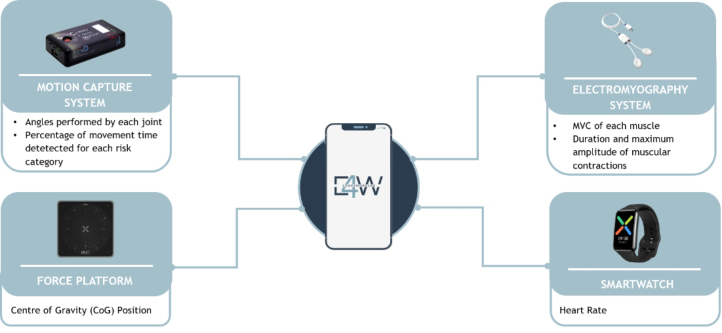
Ergo4workers (E4W) is a system including a smartphone app designed to provide relevant data collected from four types of wearable sensor systems, namely: a motion capture system, an electromyography system, a force plat- form, and a smartwatch. It aims to perform an ergonomic assessment of healthcare professionals during their daily activities. For instance, parameters measured by the motion capture system allow providing feedback to these professionals on the posture adopted in a work context.
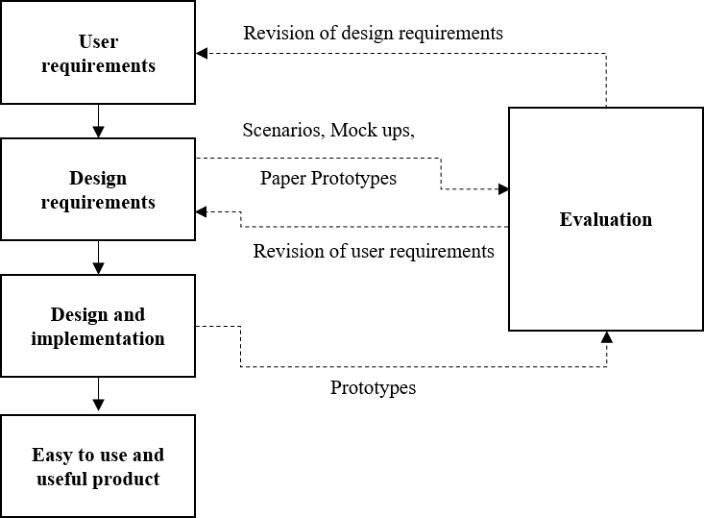
E4W was developed using a User-Centered Design (UCD) approach. UCD is a structured design methodology of a product or software that focuses on studying, understanding, and meeting users’ needs throughout all stages of development (Vasmatzidis, 2006). Figure 1 shows the development pro- cess of a UCD approach. After understanding and specifying the context of use, these three phases are performed iteratively: specifying user and design requirements; solution design and implementation; and evaluation. The com- plexity of human-computer interaction means that it is not possible to fully specify every aspect of this interaction in detail at the beginning of the deve- lopment. Thus, there are user needs and expectations, relevant to the design process, which emerge only in the course of development (ISO 9241-210, 2010; Nunes, 2006). Each iteration results in the design of a new prototype. Usability metrics allow the assessment of these three usability attribu- tes through the performance of usability tests (Seffah & Donyaee, 2006).
Ergo4workers: Usability Testing of the First Prototype of an App 67
Figure 1: UCD activities (Nunes, 2006).
According to Nielsen, usability testing is the evaluation of a system by testing it with representative users (Nielsen, 1993).
Effectiveness, which consists of the accuracy with which users achieve a given goal when interacting with the system (Seffah & Donyaee, 2006), is often measured by collecting metrics of task success and number of errors (Tullis & Albert, 2013). Efficiency is measured by collecting data on the number of resources required to complete a certain task (Seffah & Donyaee, 2006). These resources can be quantified through metrics of time required to perform each task and actions performed (Tullis & Albert, 2013).
Cognitive Walkthrough (CW) is a method with a task-oriented nature that is frequently applied for usability testing. It analyses how users explore and familiarise themselves with interactive systems (Fu & Schmidt, 2006). Since its proposal in 1990, new versions and extensions of CW have emerged, inclu- ding Cognitive Walkthrough for Users (CWU) (Mahatody et al., 2010). CWU is presented as an alternative to CW in which users are integrated into the eva- luation process. This process includes asking users to express their opinions out loud regarding any aspect of their interaction with the system (Granollers & Lorés, 2006).
The following sections describe the E4W prototype and present the results of the usability tests performed.
E4W: FIRST PROTOTYPE As previously mentioned, E4W includes a smartphone app developed to provide an ergonomic risk assessment of healthcare professionals. This
Figure 2: Parameters included in the interface.1 assessment is achieved by aggregating the most relevant parameters measu- red by different wearable sensor systems (Figure 2): a motion capture system (CAPTIV from Tech Ergo Appliquées), an electromyography system (PLUX Biosignals), a force platform (PLUX Biosignals), and a smartwatch (OPPO Watch 46 mm Wi-Fi).
The first prototype of E4W resulted from the first iteration of the UCD approach. For this early stage of the app’s development, a group of six occupational therapists from a Portuguese hospital was selected as represen- tative of the potential users; and an extensive observation of these healthcare professionals’ daily activities was performed to understand the context of use.
In the first stage, the system’s functional requirements were defined. This step involved a literature review process, the analysis of the information pro- vided by each wearable sensor system, and the assessment of the needs of the potential users’ group. To assess their specific needs, objectives, and pre- ferences, a brainstorming session was performed. In this session, a mock-up of the app was presented to this group of occupational therapists, and they participated actively in the definition of the user requirements.
Based on the information gathered, the requirements for the first prototype of E4W were identified. The main requirements are:
Allow to login and logout of the app, to differentiate data from each user;
Allow real-time acquisitions;
Provide information about the wearable sensor systems, especially regar- ding their placement and calibration process;
Allow to introduce characteristics of each therapy session (e.g., type of disorder of the patient; the room where the session took place);
Provide access to previous reports.
1The image of each wearable sensor system was taken directly from the supplier’s website: Motion Capture System – https://www.teaergo.com/captiv/ Electromyography System and Force Platform - https://www.pluxbiosignals.com/ Smartwatch - https://www.oppo.com/pt/accessories/watch/
Ergo4workers: Usability Testing of the First Prototype of an App 69
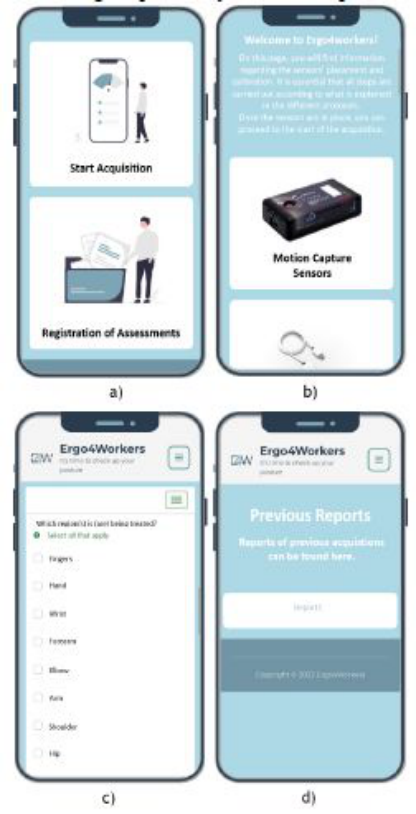
Figure 3: Examples of interfaces of E4W’s first prototype: a) homepage; b) informa- tion regarding the wearable sensor systems; c) survey to characterise the session; d) access to previous reports.
Figure 3 presents some interfaces implemented in the first prototype. These were developed considering the previously described requirements.
E4W FIRST PROTOTYPE: USABLITY EVALUATION Usability tests for E4W’s first prototype were carried out by applying the CW method (the CWU variant) and involved seven participants performing three scenarios in a laboratory environment. These were selected based on the most representative tasks to be performed when interacting with the pro- totype. A description of the scenarios and the expected number of actions to be performed is presented in Table 1.
Table 1. Scenarios description.
Table available in the original PDF paper.
Scenario Description Number of Actions
12
Sc1 Logging in 3 Sc2 Assuming the sensors are already correctly in place, performing an acquisition with the fol- lowing characteristics: (1) patient’s type of condition – rheumatologi- cal; (2) treatment regions – hand, fingers, and fist (3) workspace – high table and chair
Sc3 View the last performed assessment 2
Prior to the executing of these tests, a pilot test was carried out under the same conditions as the subsequent tests applied to the other participants. The participant chosen for this test was familiar with the technology used in the interface. Nielsen states that a pilot test should always be planned to identify problems regarding, for example, the correspondence between the time set for the test and the tasks to be performed, as well as the interpretation of the test’s instructions (Nielsen, 1993).
For each scenario, data regarding the following performance metrics were collected: task success, the time required to perform each task, the number of errors, and actions performed.
The results obtained for the time required to perform each task and actions performed were analysed by calculating the mean and standard deviation values. Errors were classified into two types according to the nature of the cognitive processes which led to their occurrence (Laubheimer, 2015). A type A error, or a slip, refers to an action the user did not intend to perform, and it is caused by attentional or perceptual failures. On the other hand, type B errors occur when the user is consciously interacting with the interface, but the set of actions is performed with the wrong intention. These errors are often referred to as mistakes.
Furthermore, at the end of the test, participants were asked to express their thoughts on the interaction with the interface. Although these suggestions do not always result in specific changes to be implemented in the interface, they can be used as a source of ideas for redesign solutions (Nielsen, 1993).
Sample Characterisation The sample of this usability evaluation consisted of seven students and pro- fessors from NOVA School of Science and Technology | FCT NOVA. 71% of participants were female, and the mean and standard deviation of their ages is 26.4 years and 5.3 years, respectively. It is noteworthy that heal- thcare professionals were not included in the tests because this evaluation aimed to eliminate the most evident usability problems. As so, more accessible participants in the physical location of the research lab were recruited.
Ergo4workers: Usability Testing of the First Prototype of an App 71
RESULTS AND DISCUSSION
The results concerning participants’ performance in the usability evaluation of the prototype for the 3 scenarios (Sc) are shown in Table 2 and Table 3. To facilitate this discussion, participants will be mentioned as “P”, followed by the respective number, as presented in the tables.
When analysing the results presented in Table 3, it is important to consider that each scenario has different levels of complexity. Thus, a different number of actions and/or duration is required. For this reason, the mean and standard deviation values obtained will not be compared between scenarios.
First Scenario (Sc1) In terms of the first scenario, it is verified that participants effectively per- formed the task, as the success rate is 100% and only 1 type B error was committed. This action was performed by P2, which selected the button “Remember Me”before logging in, although it was not requested. Regarding the assessment of efficiency, a standard deviation of 9.4 obtained for the time required to perform the task can be partially explained by the fact that some participants struggled with the smartphone’s keyboard. Furthermore, P2 and
Table 2. Results of the usability metrics task success and number of errors (effectiveness).
Table available in the original PDF paper.
Participant Task Success Number of Errors Sc1 Sc2 Sc3 Sc1 Sc2 Sc3
P1 S S S 0 1 (B) 0 P2 S S S 1 (B) 0 0 P3 S S S 1 (A) 0 0 P4 S S S 0 1 (B) 0 P5 S F S 0 2 (B) 1 (B) P6 S S S 0 1 (B) 0 P7 S F S 0 1 (B) 1 (B) Note: S – Success, F - Failure
Table 3. Results of the usability metrics with the time (in seconds) required to perform each task and number of actions performed (efficiency).
Table available in the original PDF paper.
Participant Time required to per- form each task (s)
P3 performed a number of actions superior to the 3 that were expected. One of these is attributed to the errors committed by each participant. P3 additi- onally performed 5 actions since the system was not responsive, which is not considered for this assessment.
Second Scenario (Sc2) Overall, the goals defined for the second scenario were achieved with the lowest level of performance, both in terms of effectiveness and efficiency. A total of 6 type B errors were committed. Moreover, the standard deviation obtained for the time required to perform the task shows variability in such values. As a reflection of these results, the mean calculated for the number of actions is 15.9, although 12 actions are predicted to be performed in this scenario.
The actions which contributed to these values of performance metrics were caused by moments of confusion and hesitation demonstrated by the partici- pants. It is important to note that these participants do not have experience with the technology employed, nor are familiar with the app’s context of use, which can explain the difficulties experienced in this phase of the test.
However, it is demonstrated that 5 out of 7 participants (71.4% of the sample) completed this second scenario successfully. Time was stopped when participants moved ahead to the next task. In both tests, this moment was registered close to the end of the set of actions after the filling-in of the survey. The occurrence of these failures can also be justified by the scena- rio’s description, which was not completely clear regarding the task’s final action (clicking on the button “Start now” to initiate the acquisition after submitting the survey).
Third Scenario (Sc3) Two type B errors, attributed to the same action and committed by P5 and P7, are shown for the third scenario. Although it was interpreted as an error, this action consisted of participants having to return to the app’s home page, given that they did not complete the previous scenario. This event represents a limitation on the definition of the scenarios since there is a correlation betw- een the participants’ performance in two different tasks. Furthermore, the gap between the mean value and the expected value of the actions perfor- med can be explained by the fact that, similarly to the occurrence in the first scenario, the system was not responsive. This problem can be related to the smartphone’s screen or a lack of connection to the internet. It is, then, possi- ble to conclude that the third scenario was performed with effectiveness and efficiency.
The data collected on the thoughts, feelings, perceptions, behaviours, and attitudes expressed by participants revealed an overall positive evaluation of the interface. Commentaries regarding E4W’s intuitive functionalities, use- fulness, and appealing features were frequently mentioned. Table 4 displays the usability problems experienced by participants. Based on these usability problems, improvement opportunities were identified to be implemented in the second prototype.
Ergo4workers: Usability Testing of the First Prototype of an App 73
Table 4. Usability problems identified.
Table available in the original PDF paper.
Scenario Participants Usability problem Sc2 P1, P4 The words “measurement” and “acquisition”, referring to the same action, appear on two different buttons. P1, P4 Buttons “Start Acquisition” and “Start Measurement”, as well as the ones referring to the sensors, require a direct click only on the respective image or text. As it is not possible to select any other area of these buttons, a considerable number of additional actions were performed. P1, P2, P3, P4, P5, P6, P7
All of the participants identified problems regarding the intuitiveness of the page, including information concerning wearable sensor systems’ placement and calibration. Recommendations were made. For example, replacing the systems’ names with verbs referring to actions such as “place” and/or “calibrate”. P5, P7 After submitting the survey, it is not possible to view the alert message to confirm the submission (at the top of the page) nor the button “Next” (at the bottom of the page). For this reason, two participants did not finish the task, believing that it was finished. Other participants were also hesitant at this stage of the test. Sc3 P4 Button “Registration of assessments” should be replaced, as it does not reflect an easy interpretation of its meaning. Participant P4 interpreted the word “registration” as an archive.
In the second iteration of the development cycle of E4W, modifications regarding particular layout aspects of the page displaying information about the wearable sensor systems and the survey will be prioritised.
These improvements will also focus on ensuring that the wording used throughout the interface is consistent and intuitive so that the users do not face difficulties regarding the actions to perform when interacting with the system.
CONCLUSION
Usability tests were performed on the first prototype of E4W, which includes a smartphone app whose aim is to provide an ergonomic assessment of heal- thcare professionals through the measurements of wearable sensors. The CW method was performed in a laboratory environment and involved seven par- ticipants. Performance metrics, related to effectiveness and efficiency, as well as satisfaction metrics, were collected. Overall, the results evidenced that the prototype was positively evaluated. However, some usability problems were
experienced by participants during the tests, and improvement opportuni- ties were identified. As this app is intended to be developed through a UCD approach, which is based on an iterative design and evaluation process, the improvement opportunities will be implemented in a second prototype to be tested in a real work environment.
ACKNOWLEDGMENT
The authors acknowledge Fundação para a Ciência e a Tecnologia (FCT.IP) for its financial support through the grant UIDB/00667/2020 (UNIDEMI).
REFERENCES
Bevan, S. (2015). Economic impact of musculoskeletal disorders (MSDs) on work in Europe. Best Practice & Research Clinical Rheumatology, 29(3), 356–373. https: //doi.org/10.1016/j.berh.2015.08.002 European Agency for Safety and Health at Work. (2019). Work-related musculoske-
letal disorders: Prevalence, costs and demographics in the EU. European Agency for Safety and Health at Work. (2020). Musculoskeletal Disorders In The Healthcare Sector. Fu, L., & Schmidt, K. (2006). Usability Evaluation. In W. Karwowski (Ed.), Interna-
tional Encyclopedia of Ergonomics and Human Factors (2nd ed., Vol. 1). Taylor & Francis Group. Granollers, T., & Lorés, J. (2006). Incorporation of users in the Evaluation of Usability by Cognitive Walkthrough. In R. Navarro-Prieto & J. L. Vidal (Eds.), HCI related papers of Interacción 2004 (pp. 243–255). Kluwer Academic Publishers. https://doi.org/10.1007/1-4020-4205-1_20 ISO 9241–210. (2010). Ergonomics of human-system interaction—Part 210: Human-centered design for interactive systems. Kujala, S., Kauppinen, M., & Rekola, S. (2001). Bridging the Gap between User
Needs and User Requirements. 7. Laubheimer, P. (2015). Preventing User Errors: Avoiding Unconscious Slips. Nielsen Norman Group. https://www.nngroup.com/articles/slips/ Mahatody, T., Sagar, M., & Kolski, C. (2010). State of the Art on the Cogni-
tive Walkthrough Method, Its Variants and Evolutions. International Jour- nal of Human-Computer Interaction, 26(8), 741–785. https://doi.org/10.1080/ 10447311003781409 Nielsen, J. (1993). Usability Engineering. Academic Press. Nunes, I. L. (2006). Ergonomics and Usability – key factors in Knowledge Society.2, 8. Nunes, I. L. (2007) Knowledge acquisition for the development of an upper-
body work-related musculoskeletal disorders analysis tool. Human Factors and Ergonomics in Manufacturing, 17(2), pp. 149–162. Nunes, I. L., & Bush, P. M. (2012). Work-Related Musculoskeletal Disorders Assessment and Prevention. In Ergonomics—A Systems Approach. InTech. Seffah, A., & Donyaee, M. (2006). Metrics and Measurement of Usability. In W.
Karwowski (Ed.), International Encyclopedia of Ergonomics and Human Factors (2nd ed., Vol. 1). Taylor & Francis Group. Stack, T., Ostrom, L. T., & Wilhelmsen, C. A. (2016). Occupational ergonomics: A practical approach. Wiley.
Ergo4workers: Usability Testing of the First Prototype of an App 75
Stefana, E., Marciano, F., Rossi, D., Cocca, P., & Tomasoni, G. (2021). Wearable Devices for Ergonomics: A Systematic Literature Review. Sensors, 21(3), 777. https://doi.org/10.3390/s21030777 Tullis, T., & Albert, B. (2013). Measuring the User Experience: Collecting, Analyzing,
and Presenting Usability Metrics (2nd ed.). Elvesier. Vasmatzidis, I. (2006). User Requirements in Information Technology. In W. Karwowski (Ed.), International Encyclopedia of Ergonomics and Human Factors (2nd ed., Vol. 1). Taylor & Francis Group.
LISTED IN THE AHFE DIGITAL BOOKSTORE CATALOGUE
Explore the complete digital volume
Human Factors and Systems Interaction
Read this individual research paper free through the original publisher, or explore the full digital proceedings book.
ISBN 978-1-958651-60-5
Explore this ISBN in the AHFE Bookstore ↗Listed in the July 2026 bookstore catalogue; search by ISBN to confirm current availability · Digital book purchase optional