Saad Almesalm, Mariam Alshahrani, Raneem Aldajany, Faisal Almahmoud (2022). Smartphone application designed to support the visually impaired people and enhance the user experience of entertaining events in Saudi Arabia. In: Usability and User Experience. AHFE Open Access, vol. 39, pp. 428–433. https://doi.org/10.54941/ahfe1001738
Saudi Arabia sponsors various amazing events annually. The General Entertainment Authority (GEA) is in charge of organizing and running the events. These events are local and international and the kind of an event differs from one city to another including concert, parade, winter wonderland park, safari etc. With the great services provided by (GEA) during the event to visitors, however; visually impaired people need assistance in navigating and exploring entertainment places due to extreme lack of accessibility. We aim to create a smartphone application to support visually impaired people in terms of accessibility to entertaining places with enjoyment and valuable user experience. It is proposed that user empathy may be helpful to offer a solution to the following questions:What are the pain points visually impaired users feel when attending entertaining events?What are the scientific findings in the following methodologies: desk research, user interview, usability testings? How do visually impaired users cope with events in Saudi Arabia in terms of navigation?How can a smartphone application help visually impaired people navigate in events?This paper follows a specific set of stages from the initiative idea to the release of the product; however, the first three stages of the product will be included and the rest two stages will be part of future research. The stages are brainstorm, define, design, test, and launch. The purpose of this paper is clear and easy to use, we want to help those who struggle in public events due to vision impaired. We want to make their experience as enjoyable and beautiful as possible. In addition, the design of the app is a reflection of what our targeted users think or feel toward it.
The General Entertainment Authority (GEA) is one of the initiatives that stem from Saudi Arabia’s Vision for 2030. The government of Saudi Arabia spon- sors various unique events annually, and the (GEA) is in charge of organizing and running the events. These events are local and international, and the kind of an event differs from one city to another, including concerts, parades, winter wonderland park, and safari. With the excellent services provided by (GEA) during the event to visitors, however, visually impaired people need assistance navigating and exploring entertainment places due to extreme lack of accessibility. We aim to create a smartphone application to support visu- ally impaired people in terms of accessibility to fun places with enjoyment and valuable user experience. It is proposed that user empathy may be helpful to offer a solution to the following questions:
What are the pain points visually impaired users feel when attending entertaining events?
Smartphone Application is Designed to Support Visually Impaired People 429
What are the scientific findings in the following methodologies: desk research, user interview, usability testings?
How do visually impaired users cope with events in Saudi Arabia in terms of navigation?
How can a smartphone application help visually impaired people navigate events?
STATE OF THE ART Challenges, Opportunities, and Difficulties in Terms of Navigation
The visually impaired and the blind individuals are a crucial segment of the community. There is an enhancement in the eye associated with issues and a decrease in the vision of visually impaired individuals, turning out to be a dimension to be cared for. This enhancement in the number of blind indi- viduals will impact the quality of life and develop an imbalance in society (Khan & Khurso, 2020) Moving Object Ontology (MOT) has the objective of developing formalization regarding the movement styles and the trajecto- ries that should be retrieved (Khan & Khurso, 2020). However, the MOD scalability can be termed yet as an open issue. The blind population encoun- ters several issues to access the intelligent interfaces, which are touch screens. For example, gaining access to the textual data, visual surroundings, maps, graphics, 3D (Khan & Khurso, 2020). Communication that blind people have to do with voice is subjected to the inherited problems of ineffective performance, a transformation of ascent, noisy surroundings. Moreover, it increases psychological pressure, and memorizing the instructions through voice might deteriorate users’ privacy in relaxed surroundings. Various chal- lenges which blind people face to handle Smartphone apps are mainly while making a call, sending a message, receiving emails, surfing the internet, socia- lizing, reading text, marketing, finding the location, and many more. Effective design of touch-oriented interfaces is yet a challenge, and blind people need to recognize the orientation and dynamics associated with the touch screen interfaces. Several visually impaired people suffer from navigation-oriented actions because of mishaps that prevent them from social communication and activities (Jeamwatthanachai et al. 2019). However, contrary to the outdoors, indoor navigation inside the public regions is there with their different set of difficulties. The reduction of vision of blind people makes them get subjected to difficulties that directly impact the majority of the functions, specifically those activities that require the capability to navigate. Being incapable of getting data regarding their location or the region where to go in public buildings like universities, museums, and hospitals creates difficulty finding procedures. This difficulty reduces the level of confidence in blind people to navigate independently. It is researched and found that approximately 80- 90% of the visually impaired people spent their entire life inside the buildings (Jeamwatthanachai et al. 2019). Therefore, traveling indoors for blind people becomes difficult for the adventitious blind, blindfolded and congenital blind population.
The Basic Concepts for Designing Mobile Apps and an Overview of the Museum Experience The development of touch-oriented mobile apps is crucial for visually impai- red people. However, despite the vast struggle of hardware producers to make inclusion regarding the accessibility characteristics in the mobile devi- ces that are touch-based, they are not much effective in supporting visually impaired people (Sierra et al. 2021). It can be stated that Design for Usa- bility is an essential need to attain effective feedback from the users who are visually impaired when utilizing the applications. Launching a low- vision mobile app portal is an important step taken. This portal serves to help visually impaired people by serving them with the availability of an extensive application collection specially designed for blind individu- als. The re-invention is required to be done with conventional applicati- ons like contacts, calendars, or telephones. It is essential for the effective designing of the GPS and text magnifiers (Sierra et al. 2021). To deliver a practical experience to the users, it is essential to incorporate certain kinds of controls in the applications to make good communication pos- sible with reduced vision. A button kind of system is found to validate blind people. On the usability test, evaluation can be done regarding the capability of the people navigating through varied perceptions, recognizing the controls, and communicating with them. The redesigning of certain conventional apps is done to meet visually impaired people’s requirements. These are:
Phone: “As the user moves around the screen touching numbers, the text to speech feature reads those numbers.” (Sierra et al. 2021).
Contacts: It will permit the user to develop navigation through the entire contact list. Combining voice with unique gestures will make it easier for blind individuals to locate a particular contact in the entire list.
Low vision mobile portals include apps providing facilities to the blind and visually impaired people to gain availability regarding a broad app collection that is mainly developed for them (Sierra et al. 2021). The esta- blishment of an iOS low vision library is being done to allow other users to include the controls in their applications and provide them in the reduced vision portal. However, work needs to be done in the future-oriented with mobile devices and technology to introduce innovative products to guide blind users, making their lives easier. Therefore, the aforementioned basic concepts must be implemented to design mobile applications for blind and visually impaired people. The experience of visiting the museum for blind people is majorly dependent on assistance from their family or friends or the museum personnel. Solutions for supporting an independent and interactive museum experience for blind people include continuous tracking of the loca- tion of the user and orientation for seamless interaction among the navigation and art appreciation. The indoor navigation system is one of the potential solutions for increasing the independence of blind people at the museum (Asakawa et al. 2019).
Smartphone Application is Designed to Support Visually Impaired People 431
How can Smart Tourism be Enhanced in Terms of User Experience?
The study focuses on enhancing the brilliant tourism experience for blind and visually impaired people by gamified application approach and need analysis. Tourism has been majorly focusing on substance studies for empha- sizing social matters like accessible tourism for every individual for resonating with the global call for tourism development under the sustainable note and contributing to the understanding of the aspiration of blind people in terms of exploring the tourism destination in an innovative and potentially enhancing way. This research paper utilized multisensory participant observation and interviewing to empathize with target users and gain insight into the require- ment (Huang & Lau, 2020). The study highlights discussing the significance of intelligent tourism for enhancing user experience.
SOLUTION Our proposed app follows a product development lifecycle that considers user needs. This research heavily depends on the user’s needs. Our users, in this case, are the impaired people and the volunteers. Both users are invo- lved in every stage of the design process. The five stages of the development lifecycle are taken from both the human factor and human-centered design lifecycle; identify need, research, design, test, and launch (Hix & Hartson, 1993) (Hartson & Pyla, 2012). All stages are operated iteratively, showing how important the user needs are. We only include the first three stages, which will be discussed in future research papers.
Stage 1: One idea attracted our attention to this valuable and beautiful pro- ject; the GEA is interested in helping people with an imperial vision since they present 7.1% of the disabled people in Saudi Arabia. Almost 1,445,723 mil- lion people with disabilities, and among those 811,610 are people with vision disabilities (Statistics, 2021). Unfortunately, our knowledge of the pain points for visually impaired people attending events was not helpful. Therefore, we interviewed one of the potential users to walk us through the experience in public events. This step was valuable to establish the interview question- naire for the following interviews. In addition, the interview supported us in understanding the pain points, behavior, and assistive resources.
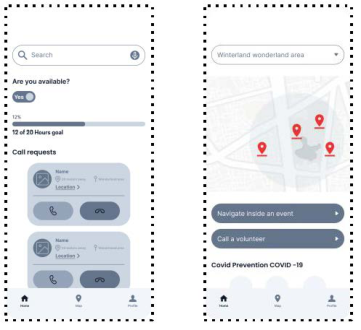
Stage 2: Later we interviewed twenty-one users to find out paint points, behavior, and assistive resources. We created the questionnaire based on mea- suring the user’s interest in attending entertainment events, difficulties related to accessibility, and methods of guidance used in public events. An empathy map and user stories are used to explore the user’s motivation in terms of what they say, think, act and feel. Also, it helps us address the most critical stories with the design. Based on the insights from the actual user interviews, we conclude that most respondents have activities that they prefer to do out- side their homes; however, a primary challenge they face is accessibility. Most users prefer to go out with someone who can help guide them, and they strug- gle with not having tailored services. The analysis stage enables us to move to the low fidelity design, which contains the basic structure of the screens such as main functions, image place, body text, and action boxes. Figure 1 describes the dashboard for each user.
Figure 1: Dashboard.Table 1. Flow issues and recommendations.
Table available in the original PDF paper.
Flow UX/UI issue Recommendation Sign up - Sign in Lack of information & instructions Replace terminology with something familiar. Provide onboarding containing enough information about how to use move me Give location access
Unclickable UI Elements on the map
Place Pin icon on the map to determine location with list of places Navigation (low confidence) In terms of user behaviour Provide a little info about volunteers
Activate maps with high accuracy for directions Call volunteer Lack of information about volunteers Share certificate Unclickable UI Elements on volunteer dashboard Provide direct way to reach certificate through home screen
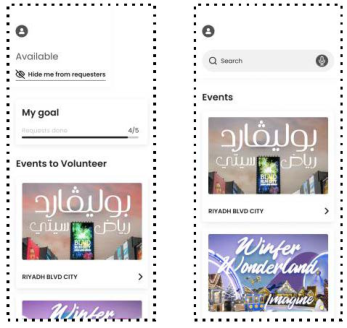
Figure 2: High-Fidelity Dashboard.
Stage 3: We want to gather feedback from the potential users on the design, we add all the necessary visual design elements. One way to learn about the design is to conduct a usability test. We tested the design on a group of volun- teers and visually impaired people to determine the usability of the Move Me
Smartphone Application is Designed to Support Visually Impaired People 433
app. Ten participants showed a willingness to participate in the study; five volunteers and five were visually impaired. We have identified the factors we will use to determine usability (Reduce cognitive load and limited options). The use cases to be covered in the usability test for visually impaired people were: Sign up, Sign in, Give location access - determine where to go, navi- gate independently within the app, call volunteers, and share certificates. The table below describes the flow, issues, and recommendations.
CONCLUSION
Enhancing the user experience for valuable people is extremely important to us. Therefore, we will continue testing the app until it reaches maturity. We have completed three different tests: user interview, usability, and desk research. The purpose of doing the tests is to learn about the pain points users may face. Also, the government of Saudi Arabia cares for those people, and it is an excellent opportunity for us to provide a helpful and purposeful solution. This shows the importance of this field to the government and an opportunity for us to provide a helpful solution. We believe that our solution is helping the visually impaired people and volunteers, but it will also reflect on society. Also, as mentioned earlier, this is an ongoing project, and thus, it will be implemented and evaluated soon.
REFERENCES
Khan, A., & Khusro, S. (2020, July 4). An insight into smartphone-based assistive solutions for visually impaired and blind people: Issues, challenges and oppor- tunities - universal access in the information society. SpringerLink. Retrieved November 13, 2021, from https://link.springer.com/article/10.1007/s10209-020- 00733-8#citeas Jeamwatthanachai, W., Wald, M., & Wills, G. (2019). Indoor navi- gation by blind people: Behaviors and challenges in unfamiliar spaces and buildings. British Journal of Visual Impairment, 37(2), 140–153. https://doi.org/10.1177/0264619619833723 Sierra, J. S., Selva „ J., Togores, R., & Tecnológicas, R. S. (n.d.). Designing
mobile apps for visually impaired and blind users using touch screen based mobile devices: IPhone/ipad. CiteSeerX. Retrieved November 1, 2021, from http://citeseerx.ist.psu.edu/viewdoc/summary?doi=10.1.1.685.2128 Asakawa, S., Guerreiro, J.P., Sato, D., Takagi, H., Ahmetovic, D., Gonzalez, D., Kitani, K.M., & Asakawa, C. (2019). An Independent and Interactive Museum Experience for Blind People. Proceedings of the 16th Web For All 2019 Personalization - Personalizing the Web. Huang, L., & Lau, N. (2020, August 2). Enhancing the smart tourism experience
for people with visual impairments by gamified application approach through needs analysis in Hong Kong. MDPI. Retrieved September 13, 2021, from https://www.mdpi.com/2071-1050/12/15/6213#cite Hix, D., Hartson, R.: Developing User Interfaces: Ensuring Usability Through Product & Process. John Wiley & Sons (1993) Hartson, R., Pyla, P.S.: The UX Book: Process and guidelines for ensuring a quality
user experience. Morgan Kaufmann (2012) Statistics, G. A. (n.d.). Disability Statistics. APD. Retrieved October 14, 2021, from https://apd.gov.sa/en/
LISTED IN THE AHFE DIGITAL BOOKSTORE CATALOGUE
Explore the complete digital volume
Usability and User Experience
Read this individual research paper free through the original publisher, or explore the full digital proceedings book.
ISBN 978-1-958651-15-5
Explore this ISBN in the AHFE Bookstore ↗Listed in the July 2026 bookstore catalogue; search by ISBN to confirm current availability · Digital book purchase optional