Gavin Kerremans, Lucas Van Dorpe, Jelle Saldien (2025). A Hand-Tracked Rotational Interface for Parameter Input in Mixed Reality CAD. In: Human Systems Engineering and Design (IHSED2025): Future Trends and Applications. AHFE Open Access, vol. 198, pp. 139–148. https://doi.org/10.54941/ahfe1006770
Mixed Reality (MR) offers opportunities to enhance early-stage Computer-Aided Design (CAD) by enabling immersive, spatially integrated workflows. However, current MR CAD systems struggle with precision, efficiency, and intuitive interaction, limiting their professional adoption. This study introduces and evaluates a novel, hand-tracked rotary input system that allows designers to manipulate CAD parameters by twisting, pushing, or pulling a virtual knob, enabling direct interaction without controllers or external menus. The rotary knob was compared with a virtual numpad in an A/B test involving 12 CAD-experienced participants. Tasks assessed speed and accuracy under time constraints and were complemented by subjective workload (NASA TLX), intuitive interaction (INTUI), and observational data. Results show that while the numpad achieved faster and more precise input, the rotary knob encouraged sustained focus on the 3D model and demonstrated rapid learning effects. Participants rated it higher on engagement (“magical experience”) and saw potential for iterative design workflows, though reliability concerns and gesture discomfort highlighted areas for refinement. The findings suggest that, with further optimization, spatially layered input techniques like the rotary knob could complement traditional CAD tools, supporting more human-centered and immersive MR design environments.
Traditional Computer-Aided Design (CAD) software offers undeniable advantages in terms of precision and technical accuracy. However, it also presents several limitations, particularly during the early stages of product development (namely, the functional, conceptual, and embodiment design phases). These early phases often demand a high degree of creative thinking, which is not always well supported by traditional CAD workflows (Hasby & Roller, 2016; Robertson & Radcliffe, 2009; Vuletic et al., 2018). To help facilitate creativity in these stages, designers employ a range of tools and strategies, one of these is commonly known as Computer-Aided Design or
CAD. Vuletic et al. (2018) identifies two extremes in CAD usage among designers: “CAD Recorders,” who use CAD primarily to formalize finalized designs, and “CAD Designers,” who rely on CAD throughout the entire design process, including for ideation. For this latter group, conventional CAD tools often fall short. These users must manage both the technical use of software and hardware and the mental effort required to visualize and structure 3D models, resulting in high cognitive load and reduced creative flow (Robertson & Radcliffe, 2009; Vuletic et al., 2018). Another challenge is the limited flexibility in user interaction. While traditional input methods such as the mouse and keyboard provide precision, they lack the natural spatial interaction and real-time feedback that can support decision-making within a true 3D design context (Piegl, 2005).
Although 3D modelling in Mixed Reality (MR) is still emerging, extensive research in Augmented Reality (AR) and Virtual Reality (VR) provides valuable insights into its potential. Several studies have shown that Extended Reality (XR) modelling environments are more intuitive than traditional 2D interfaces, as they allow users to view and manipulate their designs in life-sized, spatially embedded contexts (Blanding & Turkiyyah, 2007; Oti & Crilly, 2021; Vlah et al., 2021). This leads to faster iteration cycles and fewer errors during detailed design. Despite these advantages, current MR CAD systems face critical limitations. Technological constraints such as imprecise hand tracking, limited input methods, and a lack of robust modelling tools often prevent seamless integration with conventional CAD software. This results in fragmented workflows, where modelling must occur on a desktop environment and be separately visualized in MR (Vlah et al., 2021; Zhong et al., 2005). Additionally, file transfers between systems often exclude geometric or parametric data, breaking continuity and increasing cognitive demand (Jezernik & Hren, 2003; Zhong et al., 2005).
Even though MR CAD has clear potential for enhancing intuitive 3D design, the market lacks accessible, integrated solutions. Existing tools are either prohibitively expensive, poorly developed, or insufficiently embedded within conventional CAD workflows. Much of the current research focuses on backend architecture and software compatibility, rather than on the design of effective, intuitive MR interfaces that support real-time interaction. As a result, designers must frequently switch between modelling and visualization environments, disrupting workflow and impeding precision and decision- making (Blanding & Turkiyyah, 2007; Vlah et al., 2021).
In a preliminary exploratory study using the More3D interface in augmented reality, users completed simple CAD tasks. Their feedback indicated strong perceived usefulness (PU) of AR CAD, particularly in improving spatial understanding and early design evaluation. However, challenges related to input precision and lack of feedback limited the perceived ease of use (PEOU). These shortcomings highlighted the need for an alternative input method that could better support usability and intuitive interaction in MR design contexts.
To address this gap, the present research investigates a novel, hand-tracked rotary input system designed for parameter manipulation in MR. Specifically, it asks:
A Hand-Tracked Rotational Interface for Parameter Input in Mixed Reality CAD 141
How can a virtual rotary knob with layered interaction states (rotary knob) contribute to intuitive and precise interaction in MR CAD environments?
This leads to the following sub-questions:
Is a rotary knob with layered interaction perceived as more intuitive than current MR CAD input methods?
Does this system enhance user engagement and interaction during 3D modelling in MR?
How does this input method affect the accuracy and speed of CAD modelling in a MR environment?
METHODOLOGY
To answer the main research question, an A/B testing approach was selected. This involved comparing the rotary knob to a comparable alternative input method within Mixed Reality (MR): a virtual numpad.
While some aspects of the classical Technology Acceptance Model (TAM) by Davis (1989) such as Perceived Usefulness (PU) and Perceived Ease of Use (PEOU) have already been addressed, this study revisits PEOU through a short pre-test questionnaire. More importantly, the user experience (UX) component of the UX TAM model by Mlekus et al. (2020), which remains underexplored, is a primary focus of this study. Specifically, this work emphasizes pragmatic UX characteristics over hedonic ones, as the latter are less relevant to the research question. Figure 1 presents the UX TAM model with the associated measurement strategies.
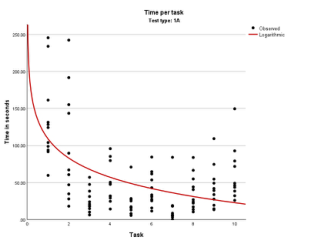
Figure 1: Visualized learning curve from rotary knob (1A, left) and numpad (1B, right).
Efficiency was measured by comparing the speed of task execution using both input methods. As users are likely unfamiliar with the virtual rotary knob, the first five input attempts were considered part of a learning curve. Each participant performed ten trials per method, allowing for an assessment of learning progression. A flattening curve in later trials would indicate adaptation. In addition, cognitive workload was measured using the NASA Task Load Index (TLX), where lower scores (especially cognitive load) indicate higher efficiency.
Output Quality was assessed by introducing a timed task to simulate conditions under which mistakes could occur. Participants were required to enter target values under time pressure, with incorrect entries counted as
errors. Ten such entries were recorded for both rotary knob and the numpad to derive a comparative score.
Clarity refers to how easily participants understand and learn an interaction method. Observational data from participants’ initial use of the vvirtual rotary knob were used, as well as the learning curve data described above.
Reliability concerns the user’s sense of control and predictability during interaction. It was assessed through post-test questionnaires and observational data.
Intuition was measured using the INTUI questionnaire by Ullrich & Diefenbach (2010), supplemented by observations and the same TPM (Task Performance Metrics) used in the UX TAM evaluation. This follows the model of three characteristics for intuition as described by Reinhardt & Hurtienne (2024). The INTUI questionnaire evaluates four components of intuitive interaction: Effortlessness, Gut Feeling, Verbalization, and Magical Experience.
Primary influencing factors: User: Prior experience with MR may increase perceived intuition. Product: Design consistency between Rotary knob and the numpad reduces bias.
Context: Regular CAD users may value effortlessness, while infrequent users may be more influenced by novelty.
Secondary influencing factors: Judgment Formation: Complex or unfamiliar UI layouts may reduce perceived intuitiveness.
Usage Mode: Strategic users are more likely to verbalize their actions than exploratory ones.
Domain Transfer Distance: Familiar interactions (e.g., numpad) may score higher on Effortlessness and Verbalization, while novel ones (e.g., Rotary knob) may rate higher on Gut Feeling and Magical Experience.
Task time decreases over repetitions; TLX scores drop Output Quality (UX TAM)
Error rates under time pressure
Fewer errors with one method
Number of errors per 10 inputs Clarity (UX TAM) Observations, learning curve
Faster adaptation Speed and success of first correct attempts Reliability (UX TAM)
Observation, questionnaire
Higher perceived control
Qualitative feedback on system behaviour Effortlessness (INTUI)
INTUI Questionnaire
Higher with experienced users
Higher scores in experienced groups Continued
A Hand-Tracked Rotational Interface for Parameter Input in Mixed Reality CAD 143
Table 1: Continued Criterion Method Expected Outcome Measurable Indicators
Table available in the original PDF paper.
Gut Feeling (INTUI)
INTUI Questionnaire
Higher with novel input methods
Higher scores in high transfer distance contexts Verbalization (INTUI)
INTUI Questionnaire
Higher in strategic use (Test 2)
INTUI Questionnaire
Higher verbalization scores in second test Magical Experience (INTUI)
Higher for unfamiliar interactions
Higher scores in users without prior experience
A custom MR application was developed in Unity for this study to ensure consistency and functionality of both Rotary knob and the numpad interactions. The application allows users to input dimensions and visually reflect these in a simple CAD-representative task. A bar object (100mm * 100mm * X mm) was used, with X being the variable dimension. The main menu offered four test modes: 1A: Rotary knob – time-based test 1B: Numpad – time-based test 2A: Rotary knob – accuracy-based test 2B: Numpad – accuracy-based test Each test consisted of ten tasks, with dimension values generated by AI based on realistic CAD adjustment behaviour (e.g., changing 495 mm to 496 mm). The system displayed actual vs. target dimensions, with green text indicating a correct match. Task transitions were automated with 2-second pauses. For the accuracy test, a tolerance of 3 mm was implemented. The user had 35 seconds per task, with green feedback for success and red for failure. Figure 2 illustrates the entire MR testing sequence.
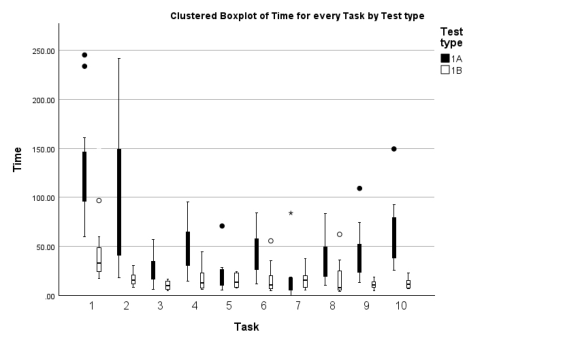
Figure 2: Clustered boxplot of time for every task by test type.
The MR application was run on a Meta Quest 3 connected via Meta Link to a laptop, which ensured consistent video output and allowed the researcher to monitor the user’s view. The researcher was positioned to observe both the user’s gestures and the live feed while minimizing distraction for the participant.
Participants first completed a questionnaire on CAD and MR experience. Then they were assigned a randomized test order (starting with either 1A or 1B) to eliminate bias, though time-based tests were always conducted before accuracy-based ones.
After each test, participants completed a structured questionnaire including:
Self-estimated average task time
Perceived reliability
INTUI Questionnaire
NASA TLX Questionnaire
RESULTS
Twelve participants from four different companies took part in the study, including product developers, clinical engineers, interior architects, and service designers. Their CAD experience ranged from daily use to less than once a month. Quantitative results were analyzed using t-tests and ANOVA, while qualitative insights were gathered through structured observation.
In terms of efficiency, both input methods showed clear learning curves. The rotary knob began slower but improved with use. While the numpad remained faster overall—averaging 24 seconds less per task—the performance gap narrowed over time. NASA TLX scores supported this: participants initially rated the rotary knob as more mentally demanding, but under time pressure, both tools yielded similar workload levels, suggesting growing familiarity.
Table 2: Comparison of NASA TLX results.
Table available in the original PDF paper.
NASA TLX Results
Comparing Results Average SD Significance 1A total 56.31 11.04 0.049 1B total 44.04 17.20 2A total 59.25 14.00 0.654 2B total 56.25 10.46 1A total 56.31 11.04 0.387 2A total 59.25 14.00 1B total 44.04 17.20 0.013 2B total 56.25 10.46
When measuring output quality, the rotary knob performed better under time constraints. Participants made fewer errors, benefiting from the layered input system’s ability to fine-tune values. Learning curve analysis confirmed
A Hand-Tracked Rotational Interface for Parameter Input in Mixed Reality CAD 145
faster adaptation for the numpad (test type 1B), but also a strong performance slope for the rotary knob (test type 1A) once understood.
Observations confirmed these trends. Users were initially hesitant with the rotary knob and suggested improvements such as continuous rotation and clearer feedback. Still, it promoted visual focus on the 3D model, which may aid in spatial reasoning during design.
Reliability ratings were mixed. Users found the rotary knob’s feedback inconsistent—primarily due to bugs—yet confidence and perceived accuracy were similar between both tools. The lack of confirmation reduced trust early on but improved with use.
The INTUI questionnaire revealed no significant difference in overall intuitiveness. While the rotary knob scored lower on effortlessness at first, this difference faded under pressure. Gut feeling and verbalization were comparable, but the rotary knob scored higher on “magical experience,” reflecting stronger user engagement once learned.
Table 3: Comparison INTUI questionnaire results.
Table available in the original PDF paper.
INTUI Questionnaire
Comparing Results Average (on 7) SD Significance Test 1A INTUI total 3.66 1.77 0.082 Test 1B INTUI total 5.00 1.81 Test 1A INTUI effortlessness 2.58 0.93 < 0.001 Test 1B INTUI effortlessness 4.93 1.41 Test 1A INTUI gut feeling 2.65 1.41 0.903 Test 1B INTUI gut feeling 2.58 1.06 Test 1A INTUI verbalizable 6.28 1.04 1.000 Test 1B INTUI verbalizable 6.28 0.95 Test 1A INTUI magical experience 4.23 0.67 0.241 Test 1B INTUI magical experience 3.73 1.27 Test 2A INTUI total 3.50 1.78 0.212 Test 2B INTUI total 4.58 2.31 Test 2A INTUI effortlessness 2.82 1.05 0.663 Test 2B INTUI effortlessness 3.01 1.16 Test 2A INTUI gut feeling 2.65 1.42 0.722 Test 2B INTUI gut feeling 2.85 1.68 Test 2A INTUI verbalizable 5.80 1.10 0.323 Test 2B INTUI verbalizable 6.19 0.74 Test 2A INTUI magical experience 4.44 0.68 0.022 Test 2B INTUI magical experience 3.48 1.15
Performance metrics showed the rotary knob excelled at small, precise adjustments but lagged behind in tasks requiring larger input changes. Users highlighted discomfort with pinch gestures and preferred more direct interaction styles.
These findings highlight both the learning demands and the interaction potential of the rotary knob. While initially more complex, it enabled more accurate, immersive input over time—demonstrating value for future MR CAD workflows.
DISCUSSION
The UX TAM model results provide a comprehensive view of how users experienced the MR CAD interface, particularly in comparing the rotary knob to a traditional MR numpad. While the rotary knob was initially slower and more mentally demanding, users demonstrated rapid adaptation. Task performance improved over the course of testing, and self-reported cognitive workload decreased, indicating a growing familiarity with the interaction style. Under time pressure, the rotary knob even produced fewer input errors than the numpad. Its layered control mechanism enabled more fine- tuned adjustments, which proved especially effective during precise, iterative modifications.
Despite these advantages, the interface presented a clear learning curve. Many users initially found the interaction unintuitive, particularly in understanding how to engage with different input layers. This early confusion led to hesitation and slower task execution. However, as participants became more familiar with the system, both input speed and confidence increased significantly. The improvement over time suggests that the rotary knob becomes not only more usable but also cognitively lighter with practice.
Reliability was another area of concern in the early stages. Participants rated the rotary knob significantly lower than the numpad in terms of system response and feedback clarity. Much of this was attributed to software bugs and the absence of clear visual or auditory confirmation cues, rather than flaws in the core interaction model. As users gained experience, their perceived control improved, and the reliability scores began to approach those of the numpad.
Notably, the rotary knob also encouraged users to remain focused on the 3D model during input, whereas the numpad tended to divert attention toward the interface itself. This difference may indicate that the rotary knob better supports continuous design engagement, particularly in workflows that benefit from immersive spatial focus. However, the added cognitive effort during initial use—driven by the novelty of both the MR environment and the interaction style—should not be overlooked. Participants consistently requested improvements such as smoother, continuous rotation and more ergonomic alternatives to the current pinch gesture.
Although the rotary knob was less suited for tasks requiring large input changes, it was highly effective in scenarios involving smaller, precise adjustments. In these cases, it matched or even outperformed the numpad in both speed and accuracy. Furthermore, users rated the rotary knob higher on the “magical experience” dimension of the INTUI questionnaire, reflecting a more engaging and satisfying interaction once the system was understood.
In summary, while the rotary knob poses some initial usability challenges, it shows strong potential as a valuable input tool for MR CAD. With refinement—particularly in the areas of gesture ergonomics, feedback mechanisms, and interface responsiveness—it could support more fluid, immersive, and human-centered design workflows. These findings suggest that alternative, spatially integrated input systems like the rotary knob may serve as meaningful complements to traditional tools in future MR CAD environments.
A Hand-Tracked Rotational Interface for Parameter Input in Mixed Reality CAD 147
CONCLUSION
This study explored how a hand-tracked virtual rotary knob with layered interaction states could support intuitive and precise parameter input in MR CAD environments. Findings from both exploratory and user testing demonstrated the potential of MR CAD tools to improve spatial understanding and lower cognitive load during early design phases. However, traditional input methods remain limited in precision and flexibility.
User testing revealed that while the rotary knob was initially slower and cognitively demanding, it outperformed a traditional MR numpad in accuracy under time pressure and encouraged greater focus on the 3D model. Despite a steep initial learning curve, participants adapted quickly, and usability improved with experience. The lack of clear feedback and system bugs reduced perceived reliability, highlighting the need for refinement.
In terms of the research questions:
1. The rotary knob was not initially more intuitive but became so over time. 2. It increased user engagement by encouraging attention to the model rather than the interface. 3. It improved modelling precision but was slower at first, with speed increasing through practice.
Future work should focus on improving gesture ergonomics, enhancing visual and auditory feedback, and integrating the rotary knob into a hybrid input system. Overall, the results suggest that with refinement, layered interaction knobs could become a valuable addition to MR CAD workflows and a step toward more immersive, human-centered design tools.
ACKNOWLEDGMENT
The authors would like to thank all the participants for conducting the tests, experts in the field with whom we had insightful conversations and the University of Antwerp.
REFERENCES
Blanding, R., & Turkiyyah, G. (2007). ECAD-A Prototype Screen-based VR Solid Modeling Environment Incorporating Tangible Deformable Models. In Computer-Aided Design & Applications (Vol. 4, Issue 5). Davis. (1989). Perceived usefulness, perceived ease of use, and user acceptance of
information technology. Hasby, F. M., & Roller, D. (2016). Sharing of Ideas in a Collaborative CAD for Conceptual Embodiment Design Stage. Procedia CIRP, 50, 44–51. https://doi.org/ 10.1016/j.procir.2016.04.131 Jezernik, A., & Hren, G. (2003). A solution to integrate computer-aided design
(CAD) and virtual reality (VR) databases in design and manufacturing processes. In International Journal of Advanced Manufacturing Technology (Vol. 22, Issues 11–12, pp. 768–774). https://doi.org/10.1007/s00170-003-1604-3 Mlekus, L., Bentler, D., Paruzel, A., Kato-Beiderwieden, A. L., & Maier, G. W.
(2020). How to raise technology acceptance: User experience characteristics as technology-inherent determinants. Gruppe. Interaktion. Organisation. Zeitschrift Fur Angewandte Organisationspsychologie, 51(3), 273–283. https://doi.org/ 10.1007/s11612-020-00529-7
Oti, A., & Crilly, N. (2021). Immersive 3D sketching tools: Implications for visual thinking and communication. Computers and Graphics (Pergamon), 94, 111–123. https://doi.org/10.1016/j.cag.2020.10.007 Piegl, L. A. (2005). Ten challenges in computer-aided design. CAD Computer Aided
Design, 37(4), 461–470. https://doi.org/10.1016/j.cad.2004.08.012 Reinhardt, D., & Hurtienne, J. (2024). Measuring Intuitive Use: Theoretical Foundations. International Journal of Human-Computer Interaction, 40(10), 2453–2483. https://doi.org/10.1080/10447318.2023.2166204 Robertson, B. F., & Radcliffe, D. F. (2009). Impact of CAD tools on creative problem
solving in engineering design. CAD Computer Aided Design, 41(3), 136–146. https://doi.org/10.1016/j.cad.2008.06.007 Ullrich, D., & Diefenbach, S. (2010). From magical experience to effortlessness: An exploration of the components of intuitive interaction. NordiCHI 2010: Extending Boundaries - Proceedings of the 6th Nordic Conference on Human- Computer Interaction, 801–804. https://doi.org/10.1145/1868914.1869033 Vlah, D., ˇCok, V., & Urbas, U. (2021). Vr as a 3d modelling tool in engineering design
applications. Applied Sciences (Switzerland), 11(16). https://doi.org/10.3390/ app11167570 Vuletic, T., Duffy, A., Hay, L., McTeague, C., Pidgeon, L., & Grealy, M.
(2018). The challenges in computer supported conceptual engineering design. In Computers in Industry (Vol. 95, pp. 22–37). Elsevier B. V. https://doi.org/10.1016/ j.compind.2017.11.003 Zhong, Y., Ma, W., & Shirinzadeh, B. (2005). A methodology for solid modelling in a virtual reality environment. Robotics and Computer-Integrated Manufacturing, 21(6), 528–549. https://doi.org/10.1016/j.rcim.2004.09.003
LISTED IN THE AHFE DIGITAL BOOKSTORE CATALOGUE
Explore the complete digital volume
Human Systems Engineering and Design (IHSED2025): Future Trends and Applications
Read this individual research paper free through the original publisher, or explore the full digital proceedings book.
ISBN 978-1-964867-74-8
Explore this ISBN in the AHFE Bookstore ↗Listed in the July 2026 bookstore catalogue; search by ISBN to confirm current availability · Digital book purchase optional